
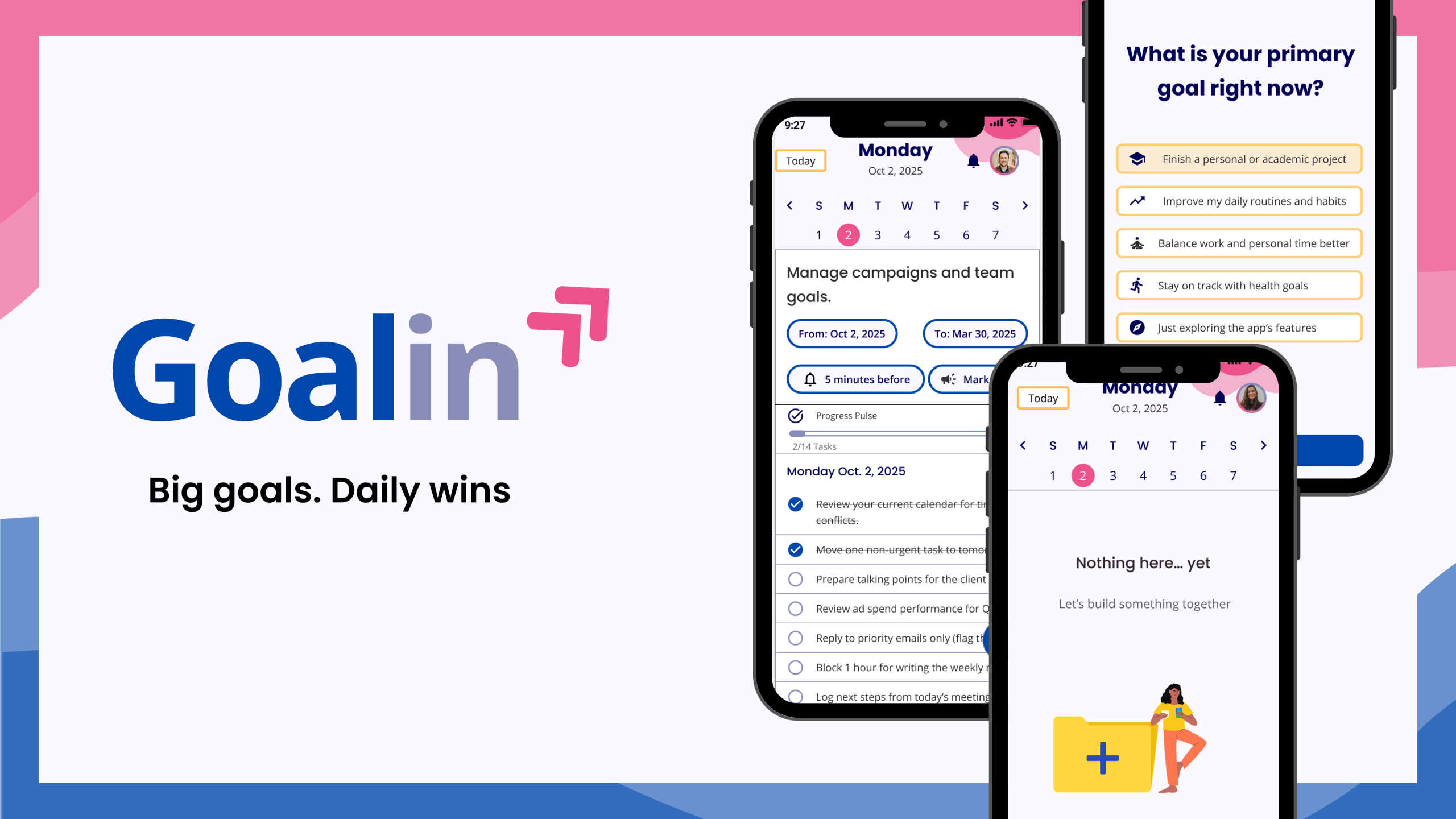
About the Project
Today’s young professionals are balancing busy careers, personal growth, and high standards, but lack tools to turn long-term goals into real progress. They need more than motivation; they need clarity, structure, and support.That’s where Goalin began: a mobile app that breaks big goals into daily tasks using AI, time blocking, calendarization, and progress tracking. The result? An engaging app that helps users to stay on track, one step at a time.
Let’s Role my Role 💃🏻
The idea for Goalin began when I noticed I was struggling with the same challenges many professionals face—trying to grow in their careers without losing balance or direction. I chose this concept as my project for the User Experience Design – Principles & Methods module in my Master’s. From August 2025 to January 2026, I led the research, identified the core problem, and designed a Minimum Viable Product (MVP) to address it.
My responsibilities:
• Defining and understanding the problem.
• Competitive Analysis.
• User research, analysis, and interviews.
• User Personas, journeys, and flows.
• Low, mid, and high-fidelity Prototyping.
• Defining Layouts and grids.
• Creation of UI elements.
• Deciding on the colour palette and overall visual assets of the app
• Usability Test plan and Script
• Conducting Usability test studies: analysing findings and making recommendations
• Applying design guidelines and iterating on design.
• Usage of Figma.
Design Process🔁
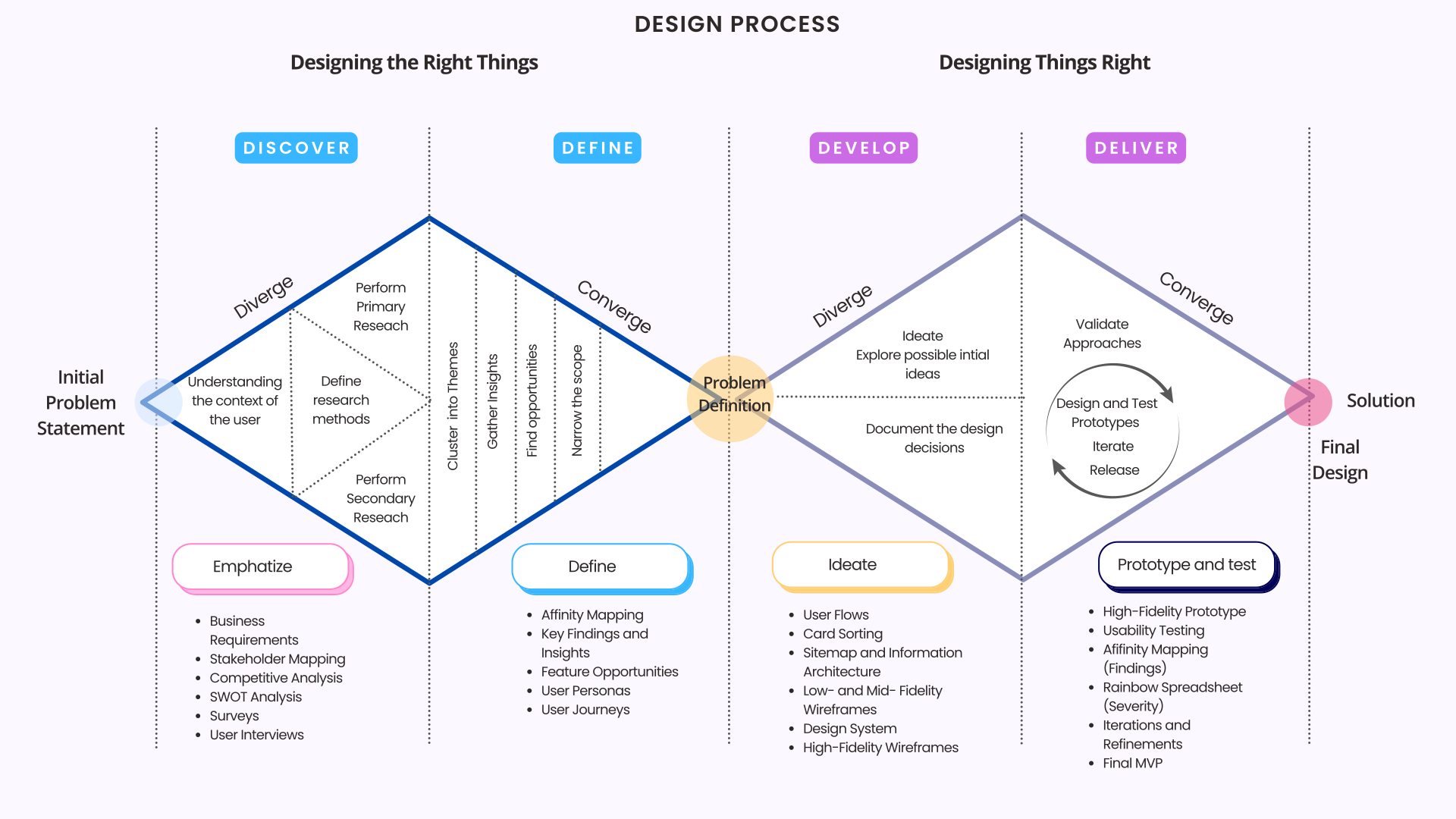
I started Goalin to address the challenges young professionals face in turning long-term goals into consistent actions. To confirm this as a real user problem, I applied the Double Diamond and Design Thinking frameworks, conducting business and stakeholder analysis, competitive research, surveys, and user interviews. I synthesized findings through affinity mapping to refine the problem definition. These insights informed the development of personas, journeys, information architecture, user flows, and feature decisions, which I then translated into Low-, Mid and High-Fidelity wireframes.I refined my decisions through iterative usability testing, resulting in Goalin: a research-driven solution that balances user needs, business objectives, and technical feasibility.
Key Players 🧩
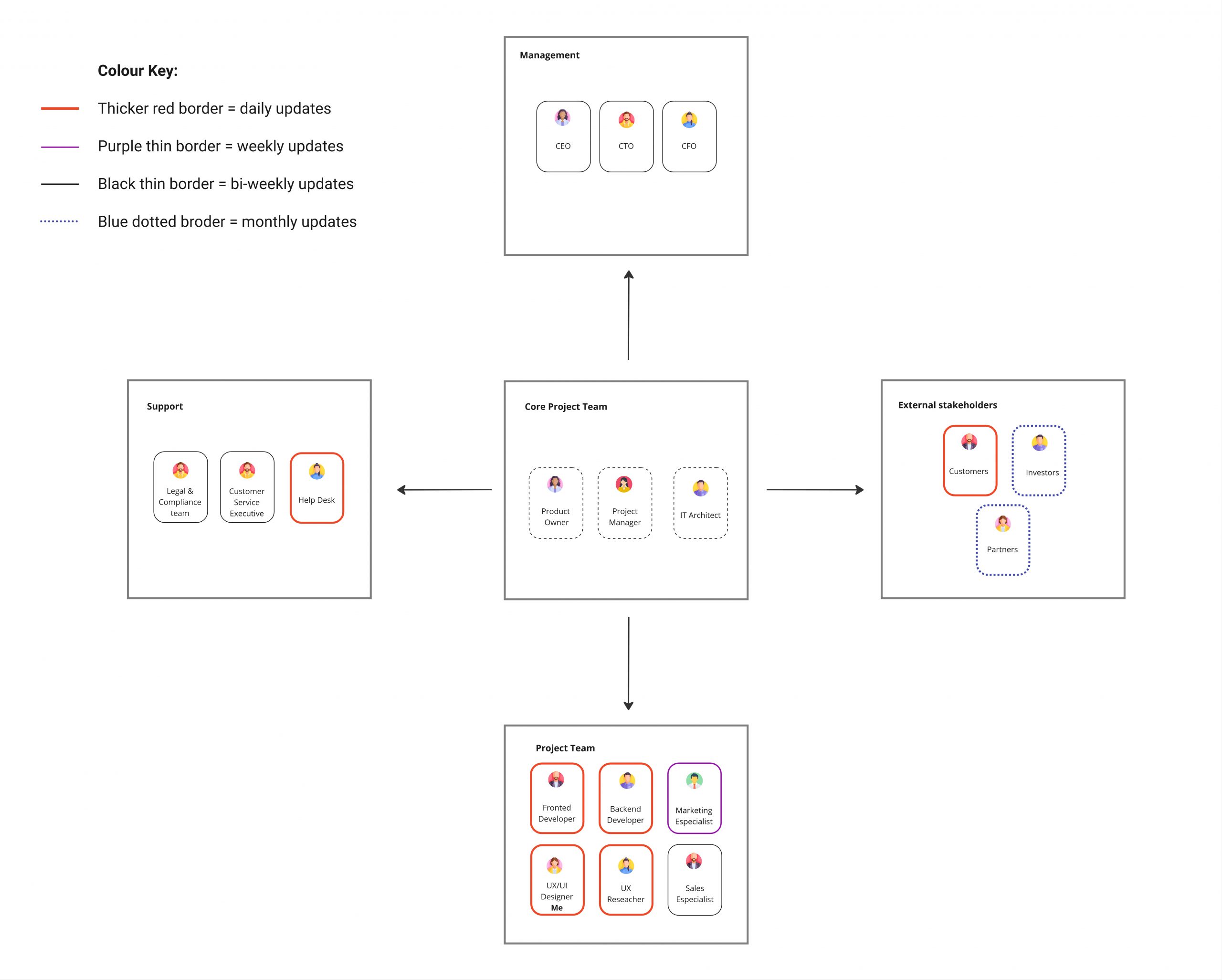
To map the project landscape, I created a stakeholder map and grouped individuals into five categories: management, core team, support, project team, and external stakeholders. I used a colour-coded system to indicate communication frequency, ranging from red for daily updates to blue for monthly check-ins. This helped set early expectations and establish a clear communication flow across roles.
Stakeholders map
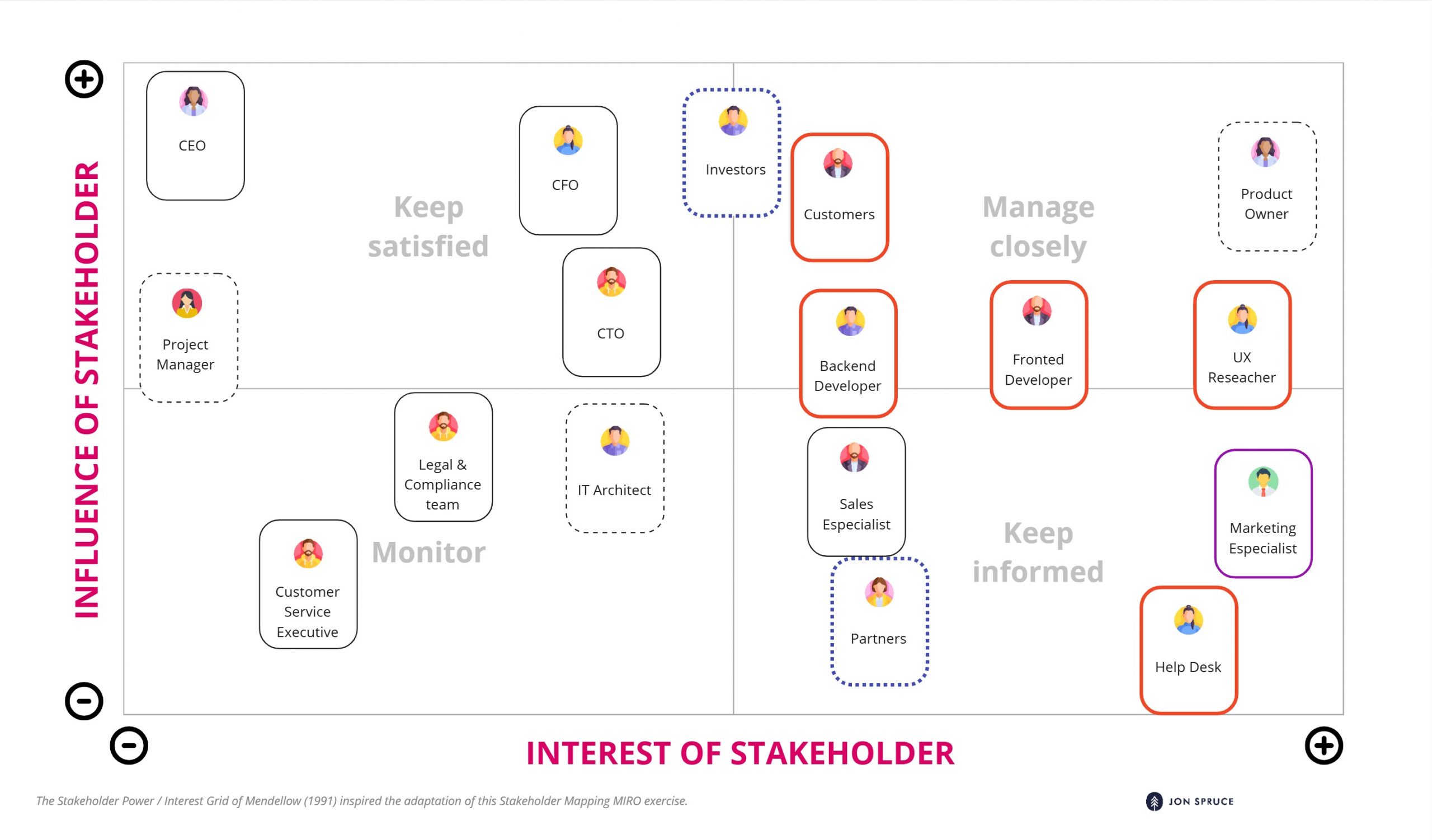
Using Mendelow’s Matrix, I developed engagement strategies tailored to each stakeholder’s influence and interest. I focused on active interaction with highly involved roles, such as product owners and customers, to address their needs and support their goals, while providing regular updates to high-interest teams, such as marketing and sales, to enhance involvement and prevent issues. For stakeholders with low interest, I maintained minimal but consistent communication to avoid overload while keeping them informed.
Problem Statement
Young professionals find it hard to turn long-term goals into daily actions because there are no structured, user-friendly tools that connect big objectives with everyday tasks. Current systems tend to be either too scattered or complex, hindering progress tracking, time management, and habit formation. This is a problem because, without an easy, clear method for breaking down large goals, many feel overwhelmed and lose motivation, often leading to abandoned goals and inconsistent routines that can harm their personal and professional lives.
How can we design a digital solution that helps young professionals break long-term objectives into daily actions and stay motivated in achieving them?
Product Pulse 📊
To establish a clear direction for Goalin, I created a Business Requirements Document that translated user needs into specific business and design decisions. It outlines challenges faced by young professionals, identifies an opportunity for an AI-powered, human-centred productivity app, and strategic goals for Goalin’s launch
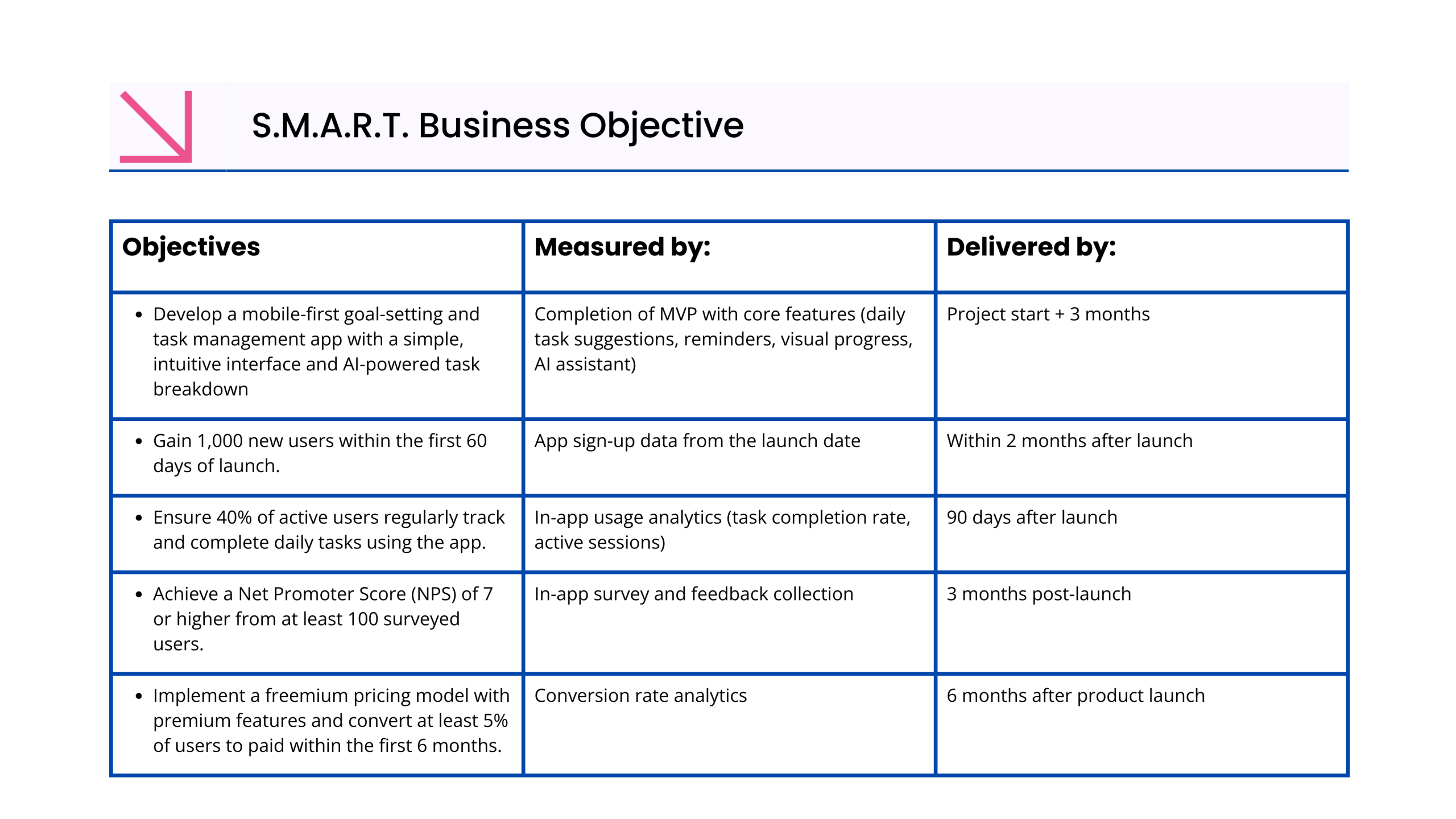
The document covers the target audience, competitive landscape, risks and opportunities, core features, and success metrics, aligning user value with business goals. This supportive foundation shaped Goalin into a focused, brand that helps users convert long-term goals into daily progress
Competitive Analysis
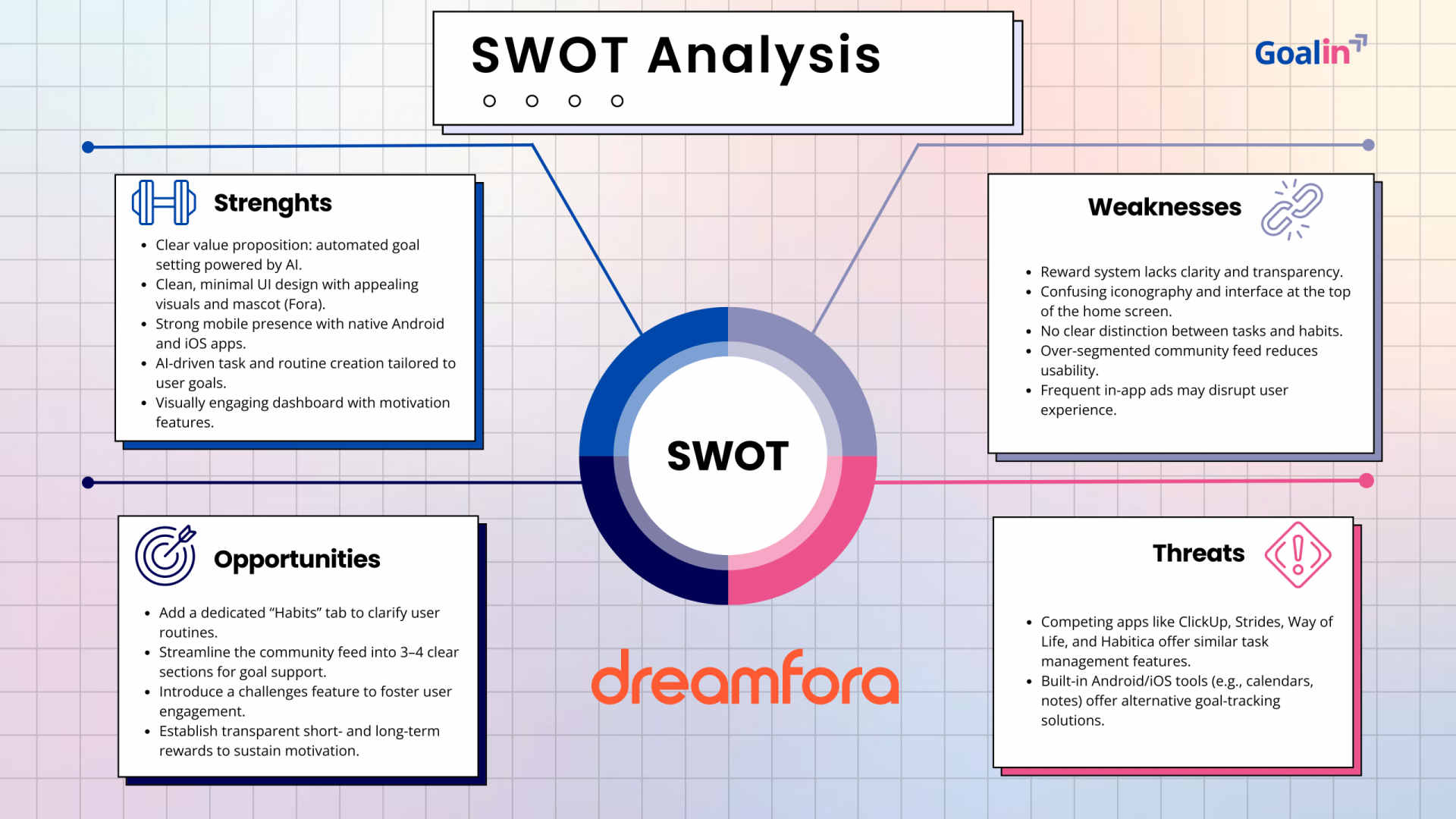
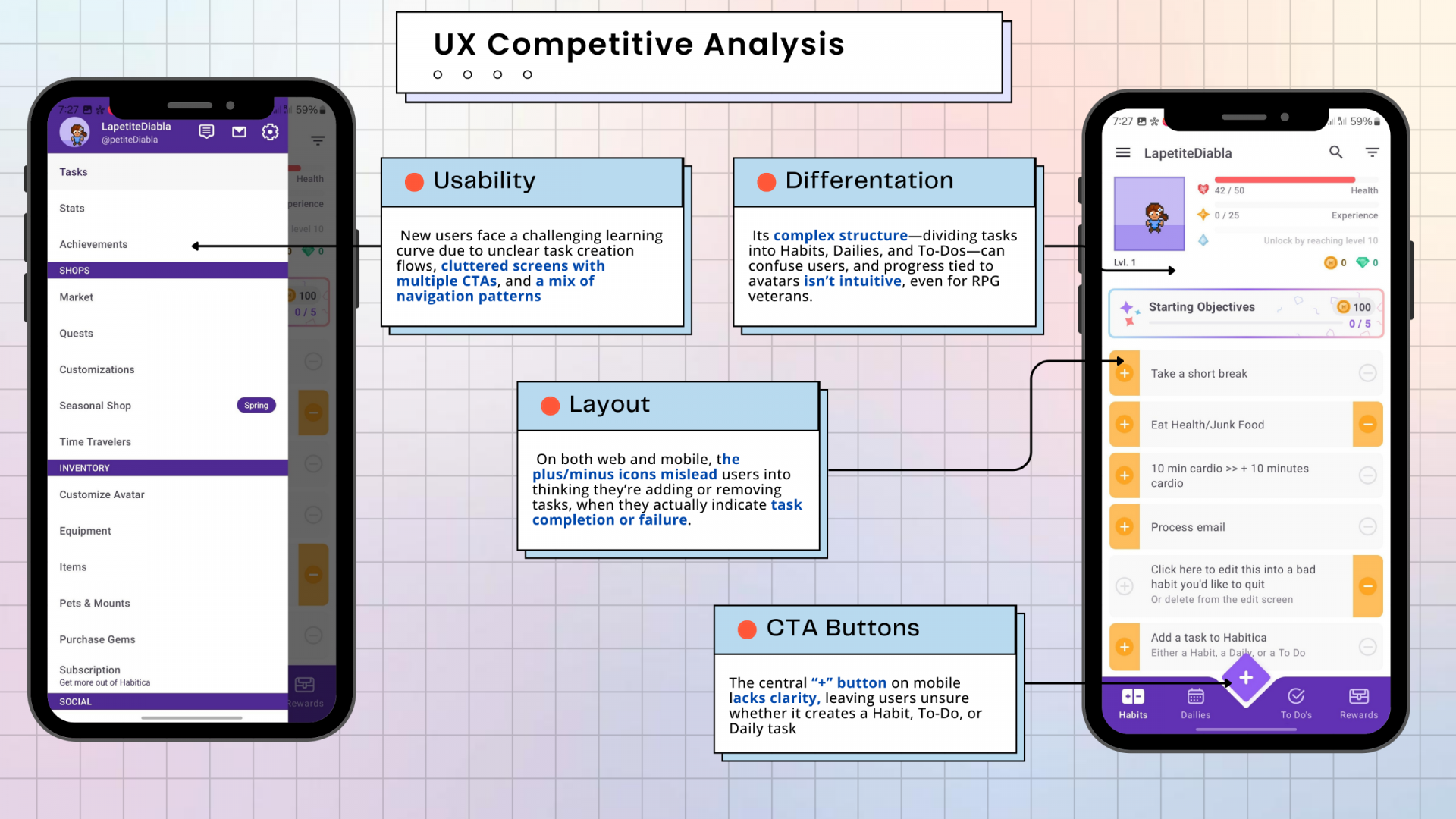
To understand Goalin’s market position and identify design opportunities, I analysed two main competitors: Habitica and Dreamfora. This included market and overall strategy profiles, SWOT, and UX reviews. I examined how each app approaches goal tracking, AI use, and motivation through gamification or automation. Both apps have standout features but also usability gaps, such as unclear onboarding, complex CTAs, and overloaded navigation. These insights helped position Goalin as a calm, intuitive brand focused on clarity, daily action, and progress made personal.
Understanding the user 🔍
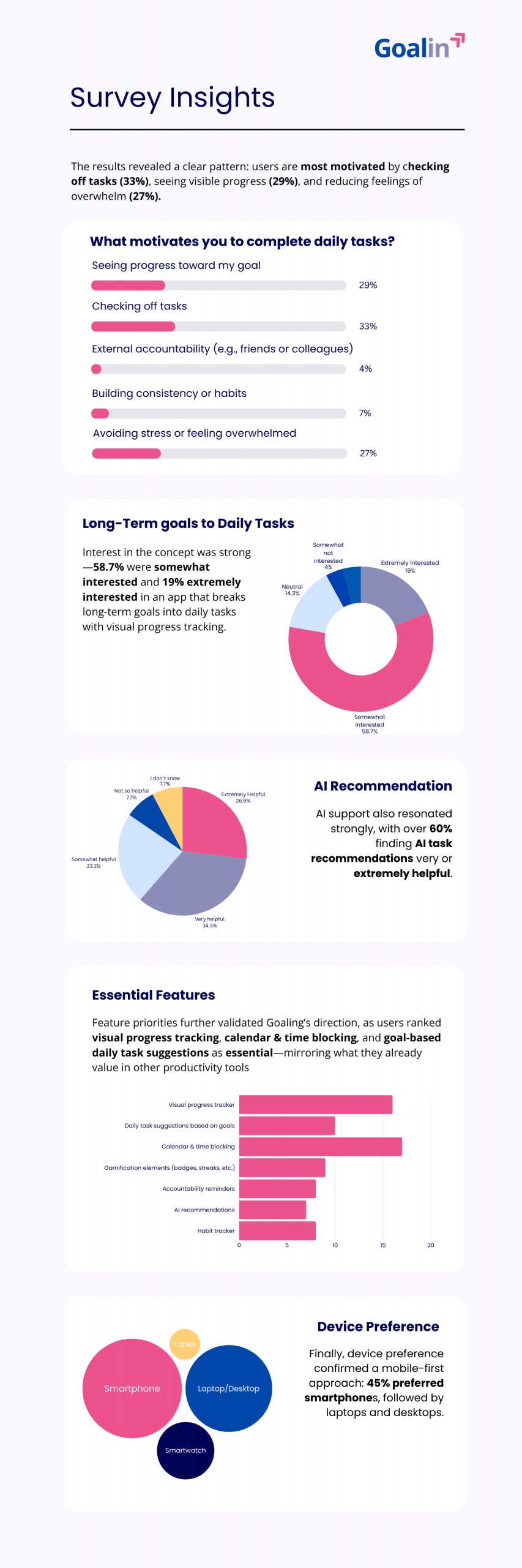
To align Goalin with real user needs, I conducted a survey using Microsoft Forms with 27 participants and 3 in-depth user interviews, all within our target group of young professionals aged 25–38. The goal was to understand their behaviours, preferences, and pain points around daily task planning and long-term goals.
Survey Insights
User Interviews
These findings shaped my research goals and interview questions, allowing me to focus on five main areas: users’ goal-setting, emotional triggers, obstacles, task approaches, tool use, and interest in an AI system. I developed a semi-structured script to explore how users plan, decompose, and stay committed to goals, and how an AI-driven experience could improve support.
“I create topics and separate them per topics”.
How do you usually approach a long-term goal? Do you break it into smaller tasks (daily/weekly)?
“Crossing out the activities is a good feeling”
What motivates you to keep working on your goals, even when it’s hard? Is it the satisfaction of progress, external accountability, avoiding stress, etc.?
“Lists with things to cross-over and reminders would be good features”.
What would be the top 2–3 features that you would like to have in a solution that helps you to achieve long-term goals?
“I want the AI to understand how I work (Personalisation)”.
What do you think about using AI to help break long-term goals into daily tasks? Why do you think that?
“Sometimes I feel overwhelmed, because I don’t identify the small things that I have to do to complete one main task”
What parts of this process (breaiking goals into dailies) work well, and what challenges do you face?
Affinity among users 🧒🏻👩🏻🦰🧔🏻👱🏻♀️
After gathering rich qualitative insights from user interviews, I used affinity mapping to organise them into themes like Task Management, Reminders, and Simplicity. This revealed clear patterns in user needs and behaviours. The process facilitated the transformation of raw feedback into actionable features for Goalin and supported my subsequent design choices with confidence.

The affinity mapping revealed that users prefer familiar, low-effort tools for managing their tasks, yet still struggle to translate long-term goals into daily actions. When goals feel complex, users become overwhelmed and abandon them. Managing progress across multiple apps adds friction, making consistency and follow-up difficult.
Insight #1: Breaking goals feels overwhelming
Users want to achieve long-term goals but struggle to translate them into daily tasks with the apps they use, often abandoning them due to complexity
Insights #2: Progress fuels motivation
Users feel more motivated when they can visually see progress and check off completed tasks
Insight #3: Reminders are essential for consistency
Users forget tasks when relying on multiple tools and need gentle prompts to stay on track.
Insight #4: Scheduling improves follow-through
Without a time structure, tasks are easily postponed or forgotten, especially during busy days.
Solution:
Solution:
Solution:
Solution:
AI-powered goal creation that automatically breaks long-term goals into clear, manageable daily tasks.
Visual progress indicators showing daily task completion and overall goal progress.
Smart reminders and notifications connected to tasks and calendar events to support daily follow-up.
Time blockers integrated into a calendar view, allowing users to schedule tasks alongside real-life commitments.
Let’s get to know our people
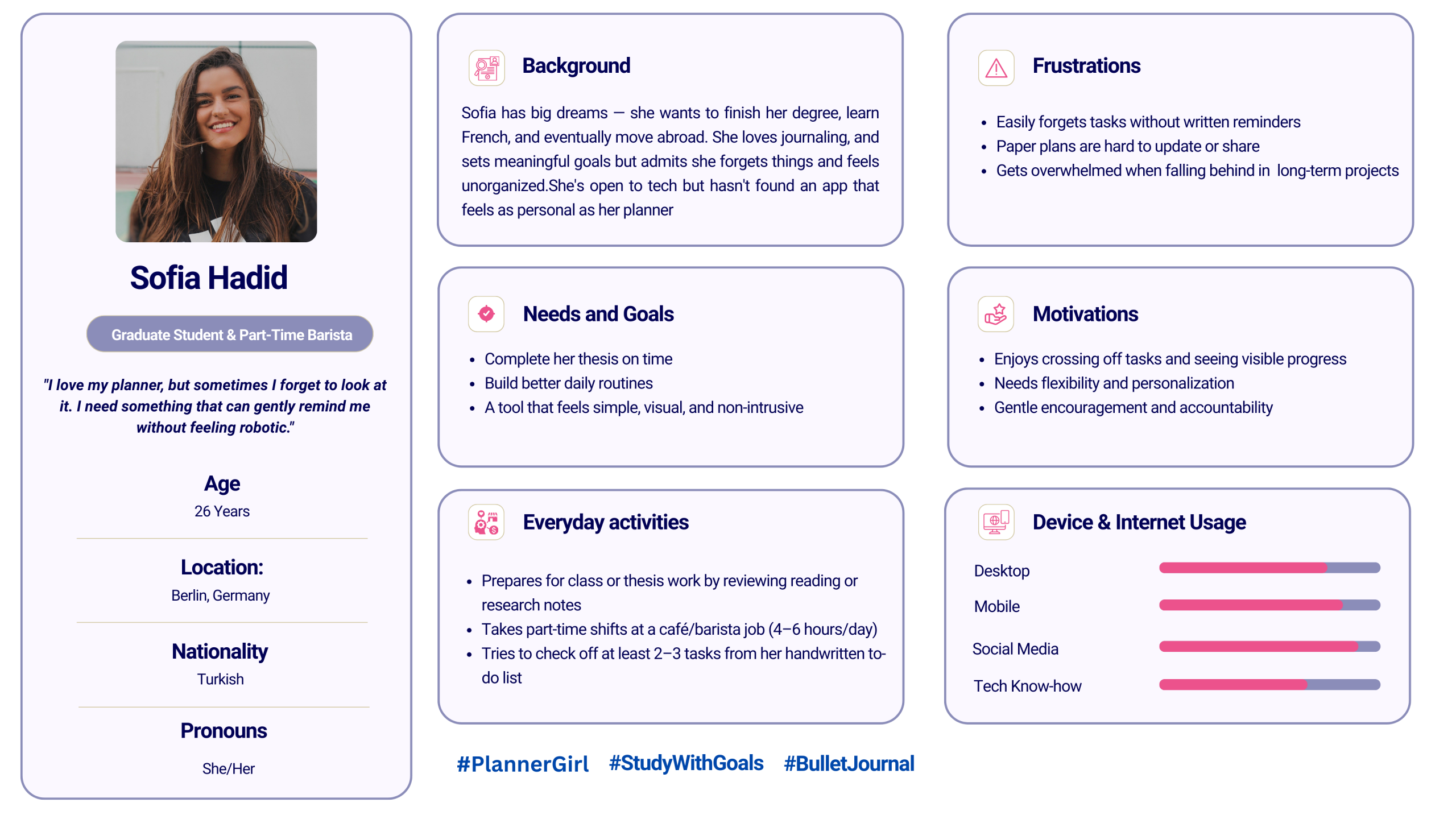
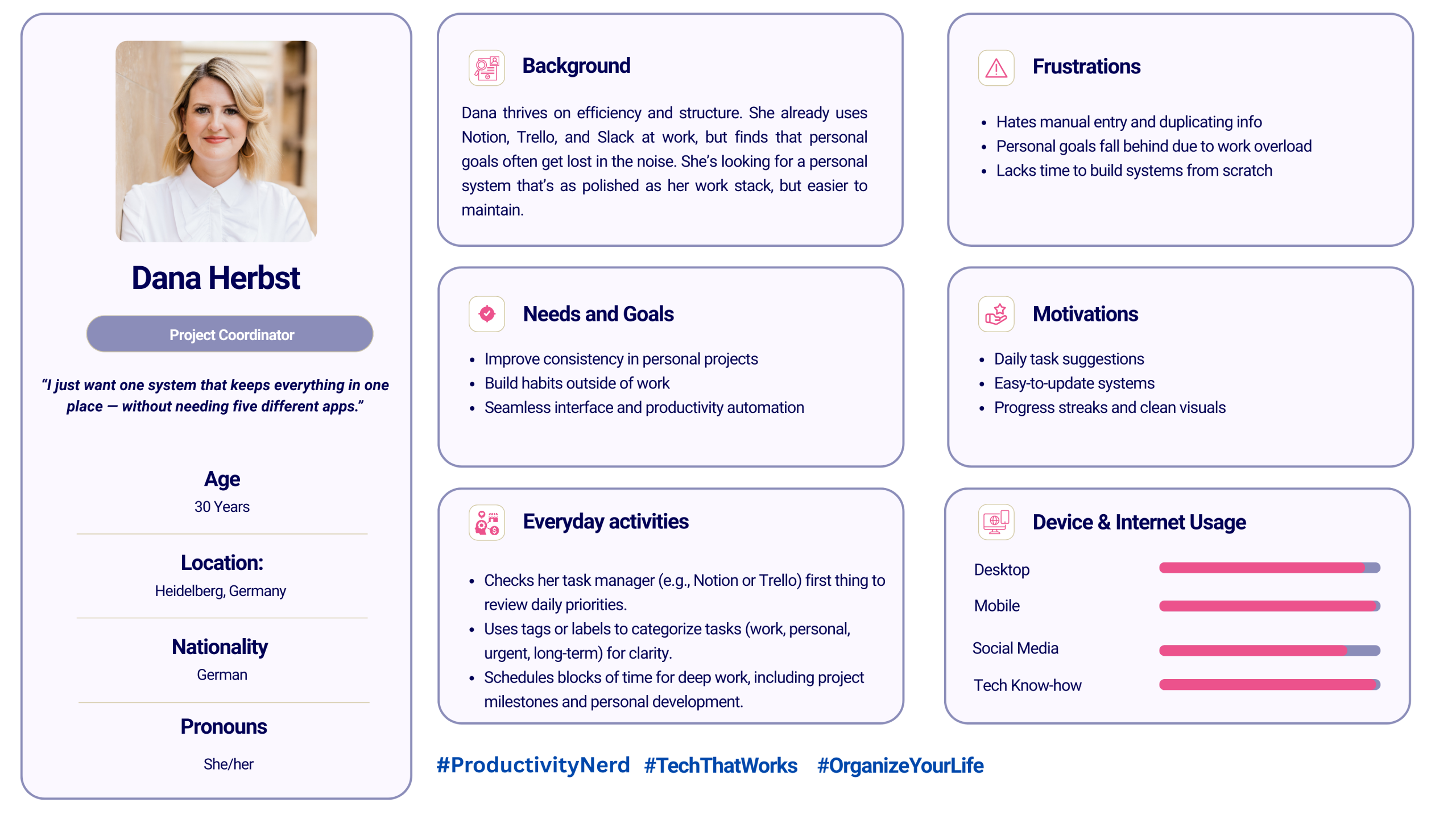
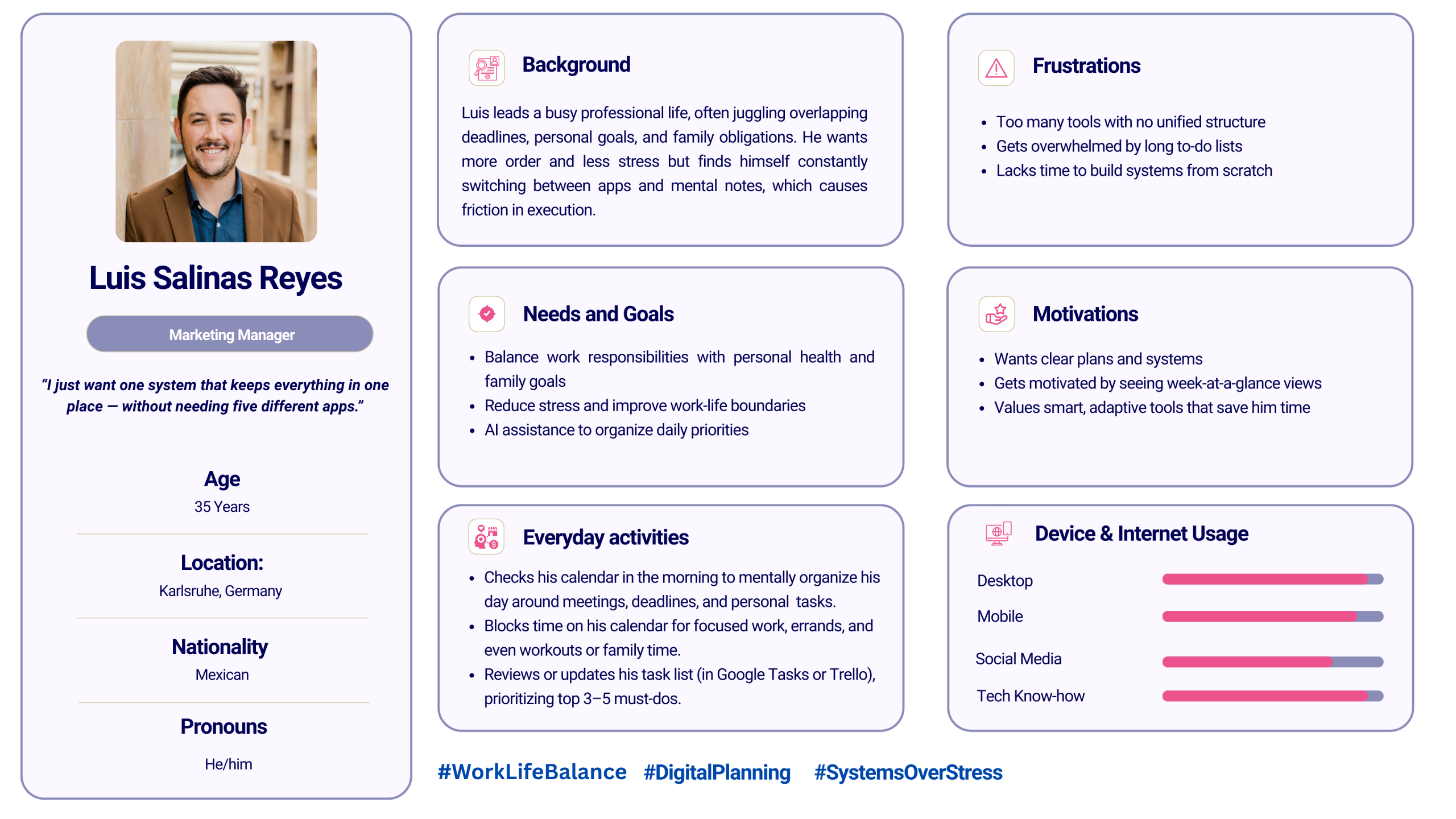
Based on the results of the user interviews, I identified key attitudes toward productivity: users want support on breaking goals into small, manageable tasks, value clear progress indicators to stay motivated, rely on time blocking to protect focus, and expect reminders to support consistency. These patterns shaped the creation of three user personas—each reflecting the core needs that would drive meaningful design decisions for the app.
Meet Sofia
Get to know Dana
Get familiar with Luis
Mapping the Experience🗺️
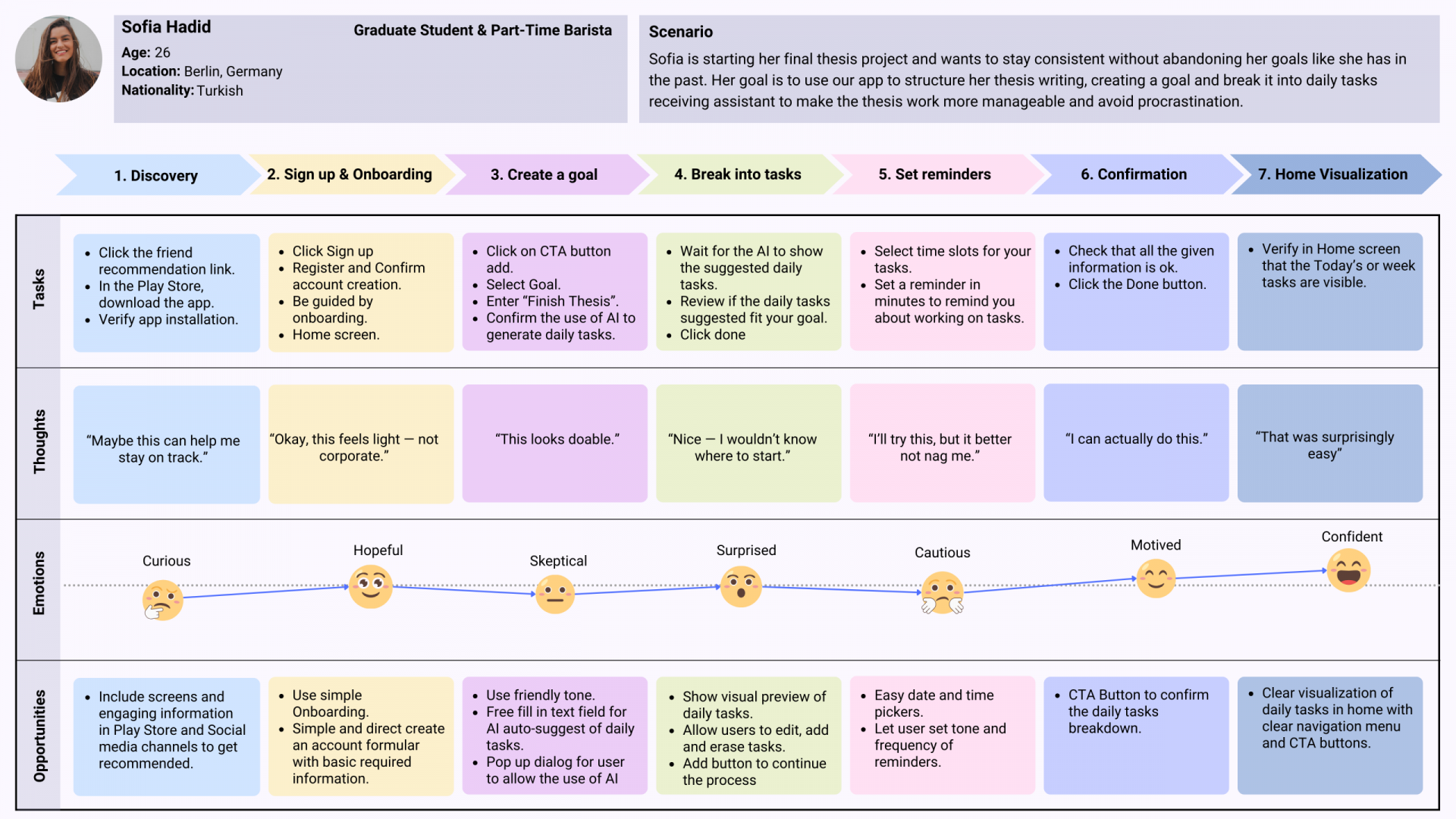
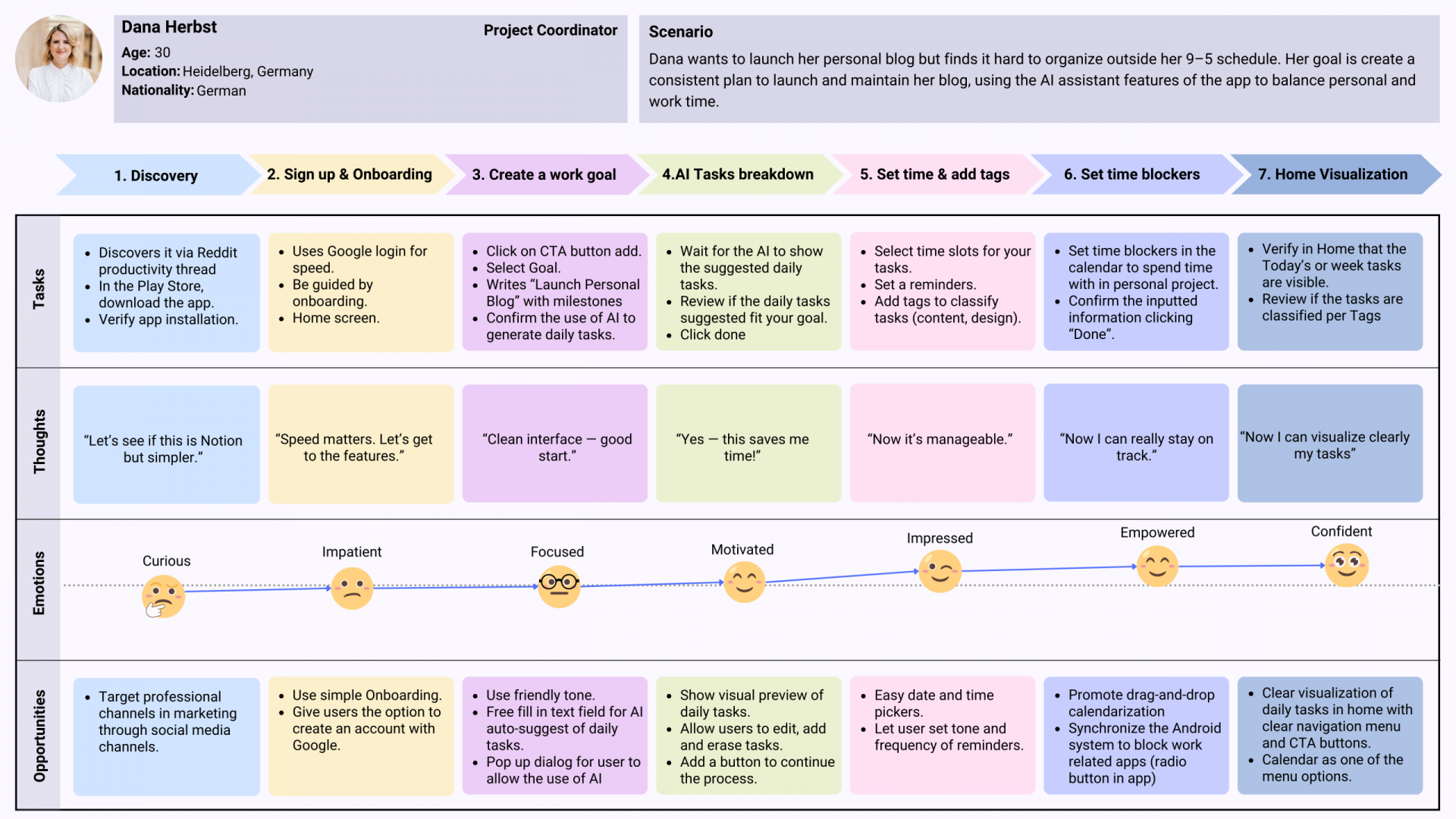
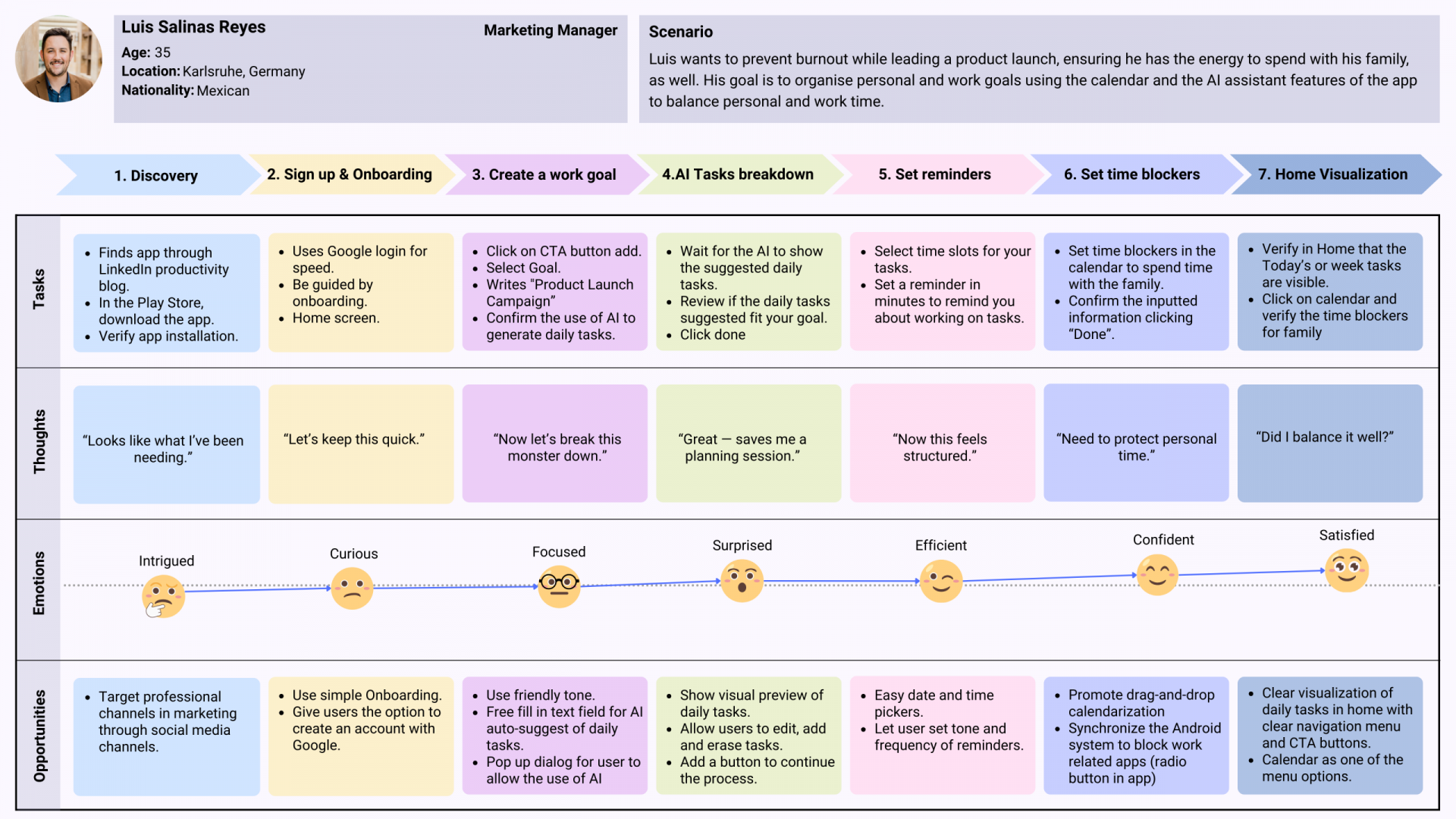
To design meaningful experiences, I created user journeys for each persona—Dana, Luis, and Sofia—mapping their paths to achieving specific goals with Goalin. Each journey is structured into phases, mapping tasks, emotions, thoughts, and UX opportunities to address user needs at every step. By integrating some quotes and insights from user interviews, I visualised real user behaviours, helping me identify pain points and moments of motivation. These journeys served as a guiding tool to shape design decisions based on empathy and targeted functionality
How It All Flows 🚣🏻♀️
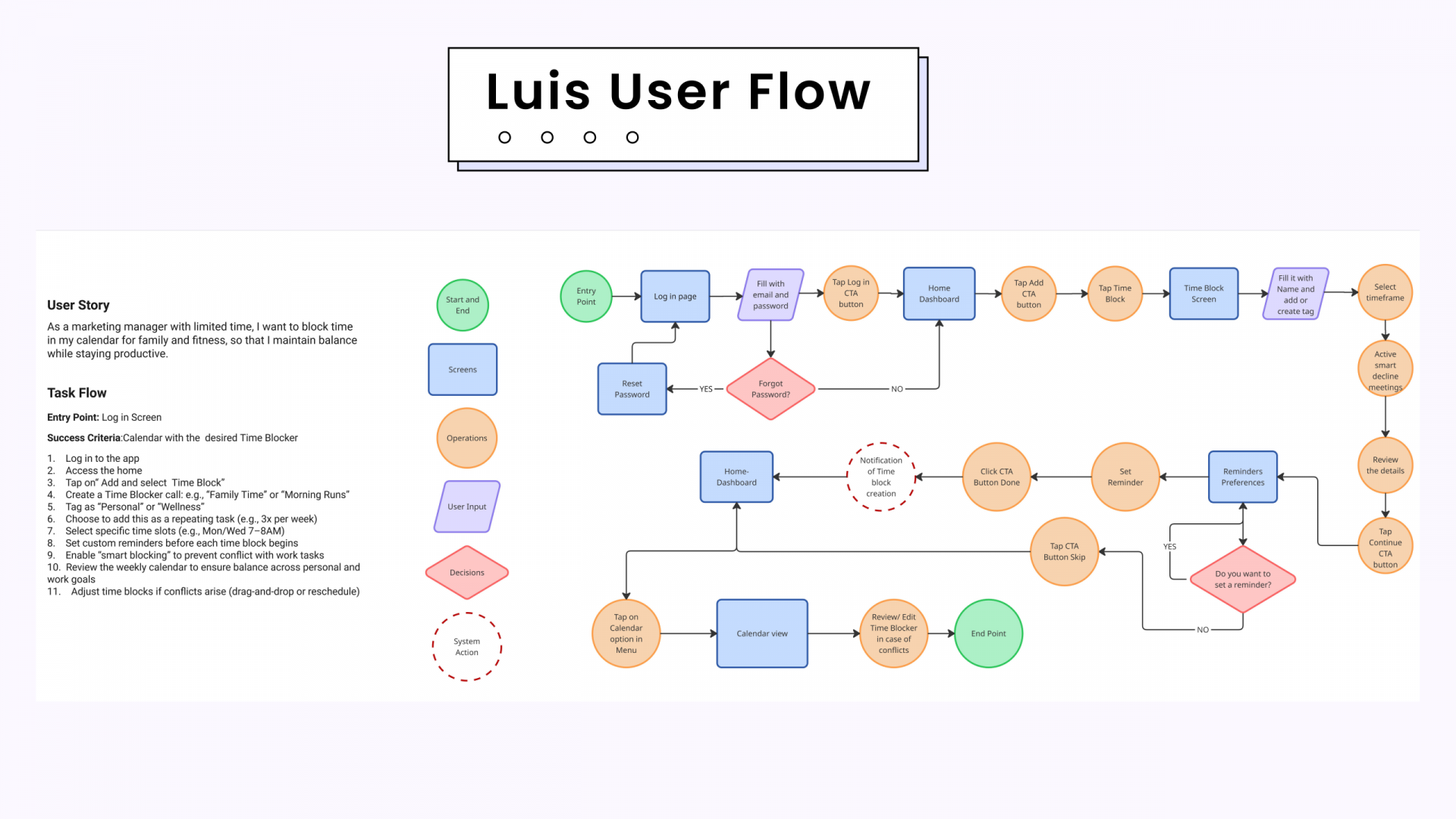
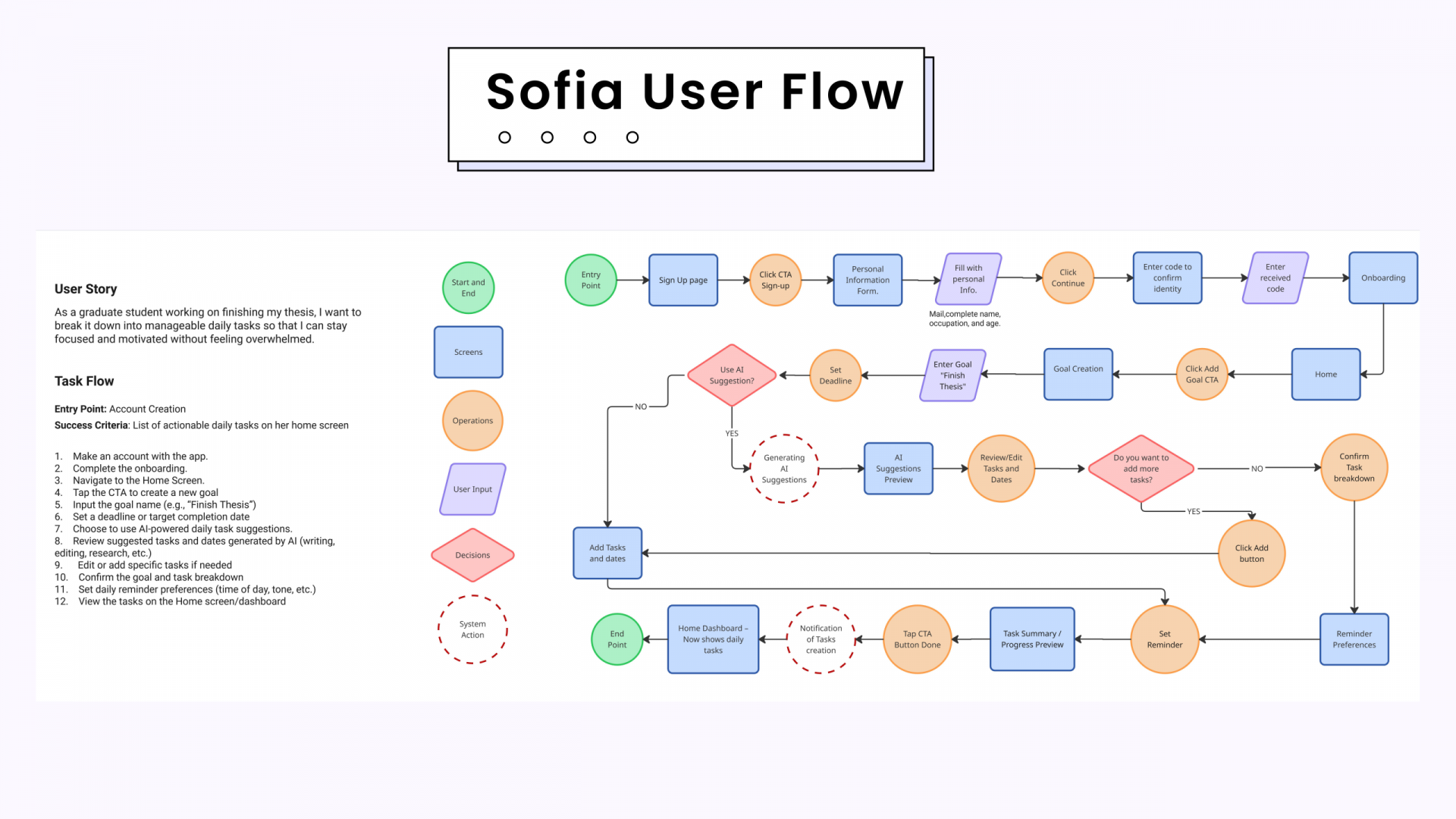
Based on research and user journeys, I developed two core user flows that support goal achievement without introducing additional complexity. The first helps users set meaningful goals and break them into daily tasks with AI assistance, while the second protects time for those private tasks through calendar-based blocking. Each flow includes clear actions, decisions, and system responses, enabling users to move confidently from intention to execution. These features are vital to Goalin’s experience, turning long-term ambitions into organised, achievable daily steps.
How It’s All Connected 🔗
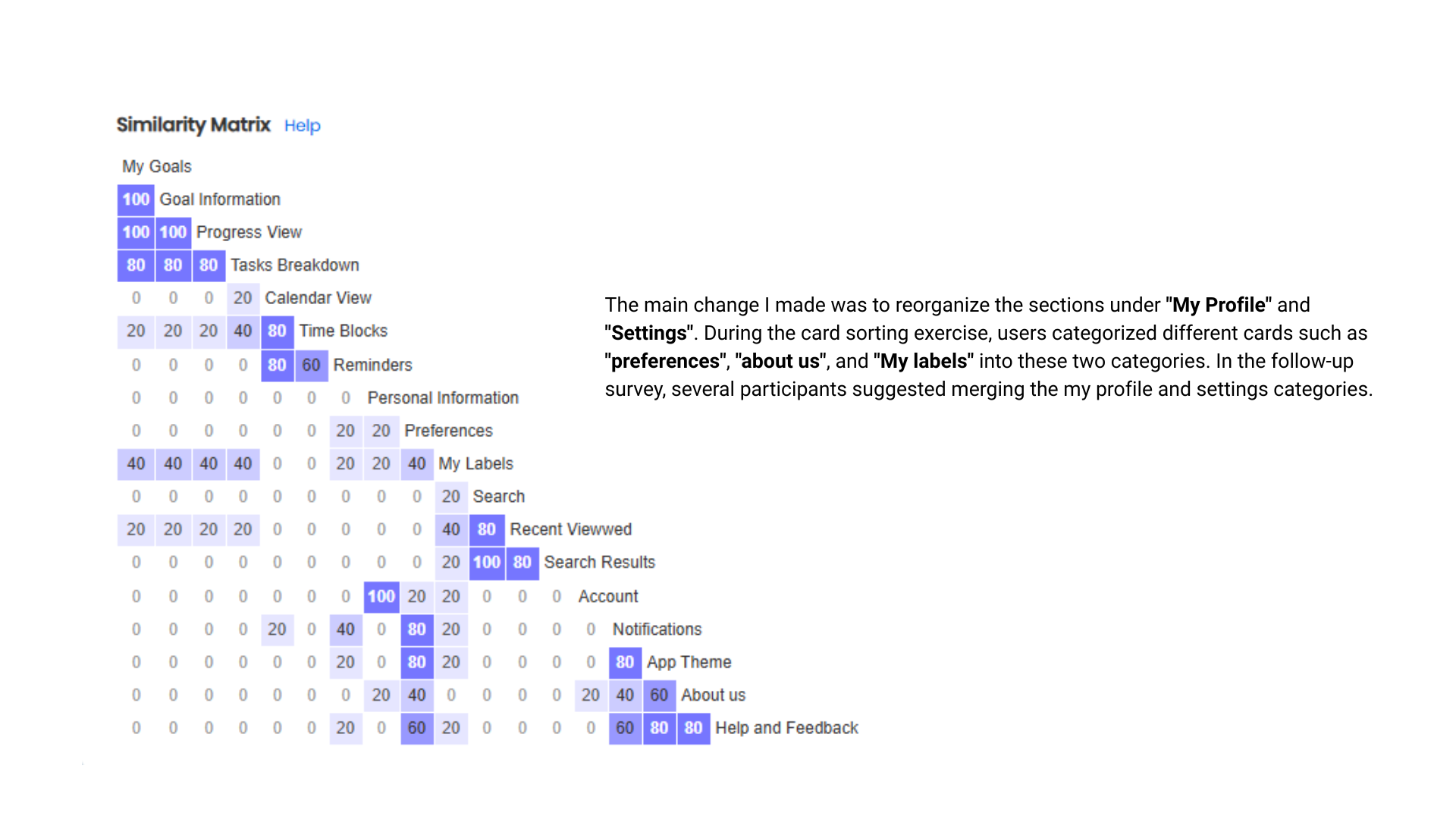
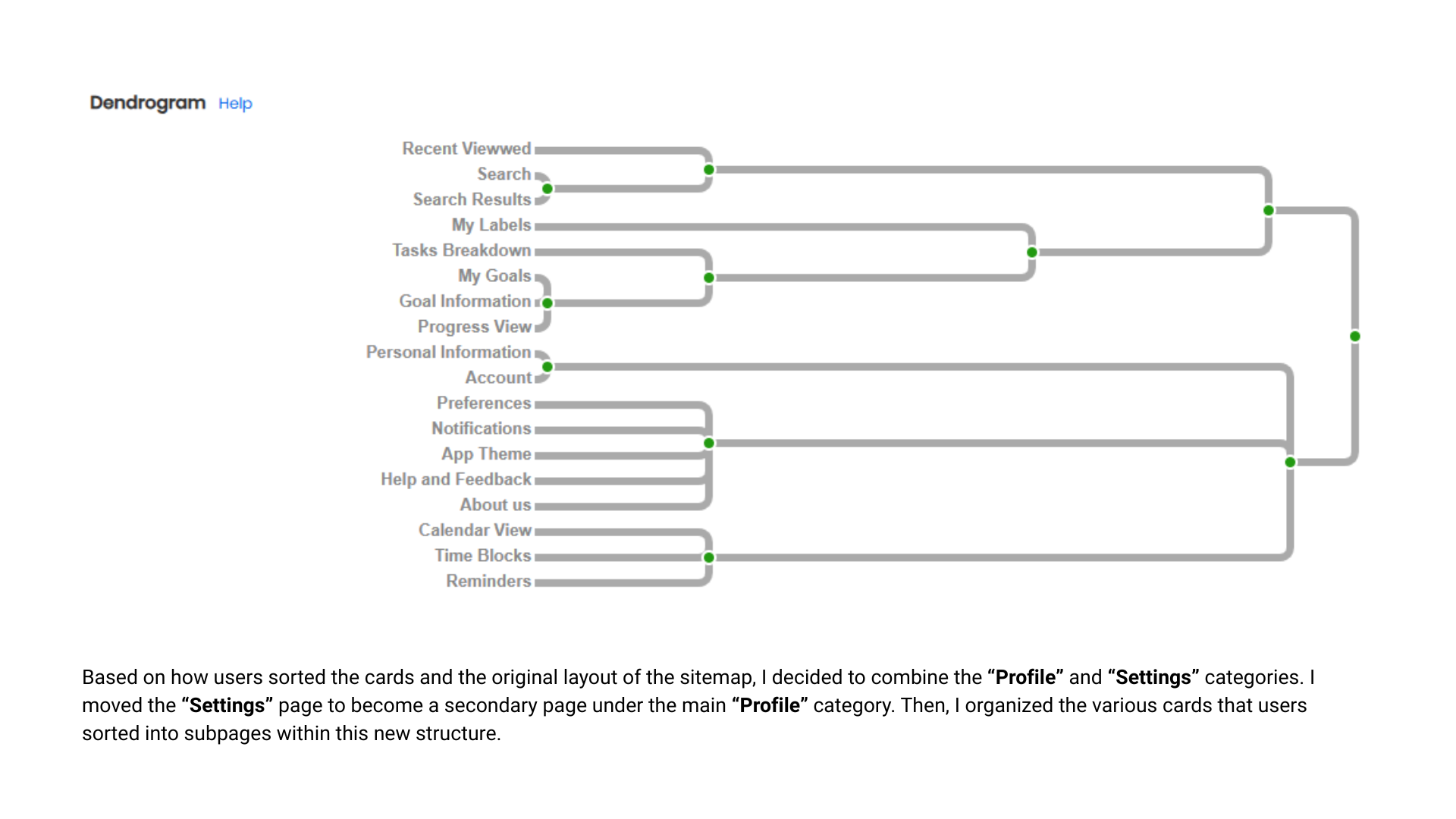
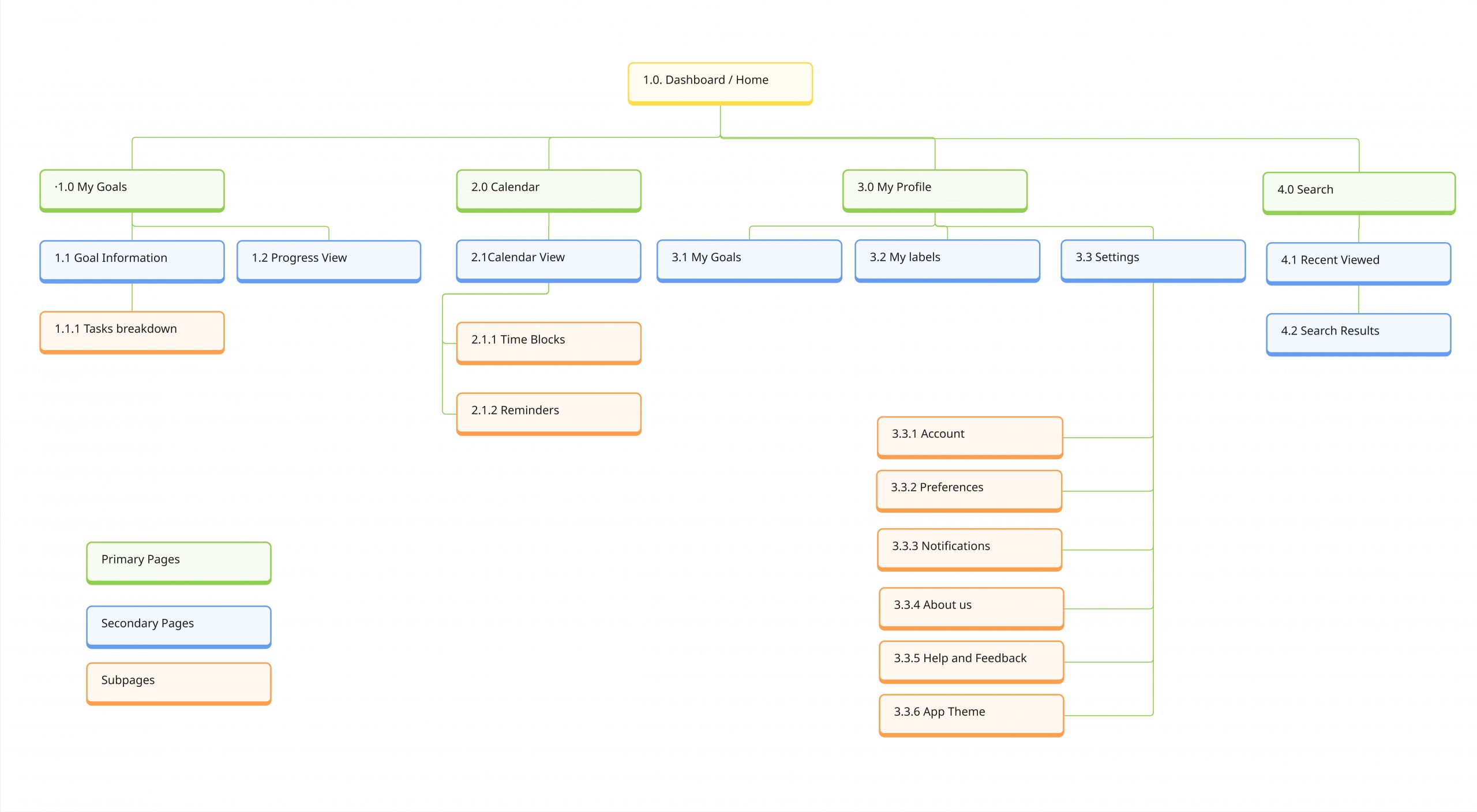
After creating an initial sitemap, I conducted a hybrid card sorting study using the “Proven by Users” platform. Users grouped content into existing and custom categories, revealing how users naturally expect features to be organized. This approach helped me confirm key navigation patterns, identify intuitive page-feature relationships, and refine the sitemap for a more user-friendly experience. The results ensured that Goalin’s structure aligns with real user expectations—supporting clarity and ease from the first tap.
Goalin Sitemap
Low-Fi, High Impact ⚙️
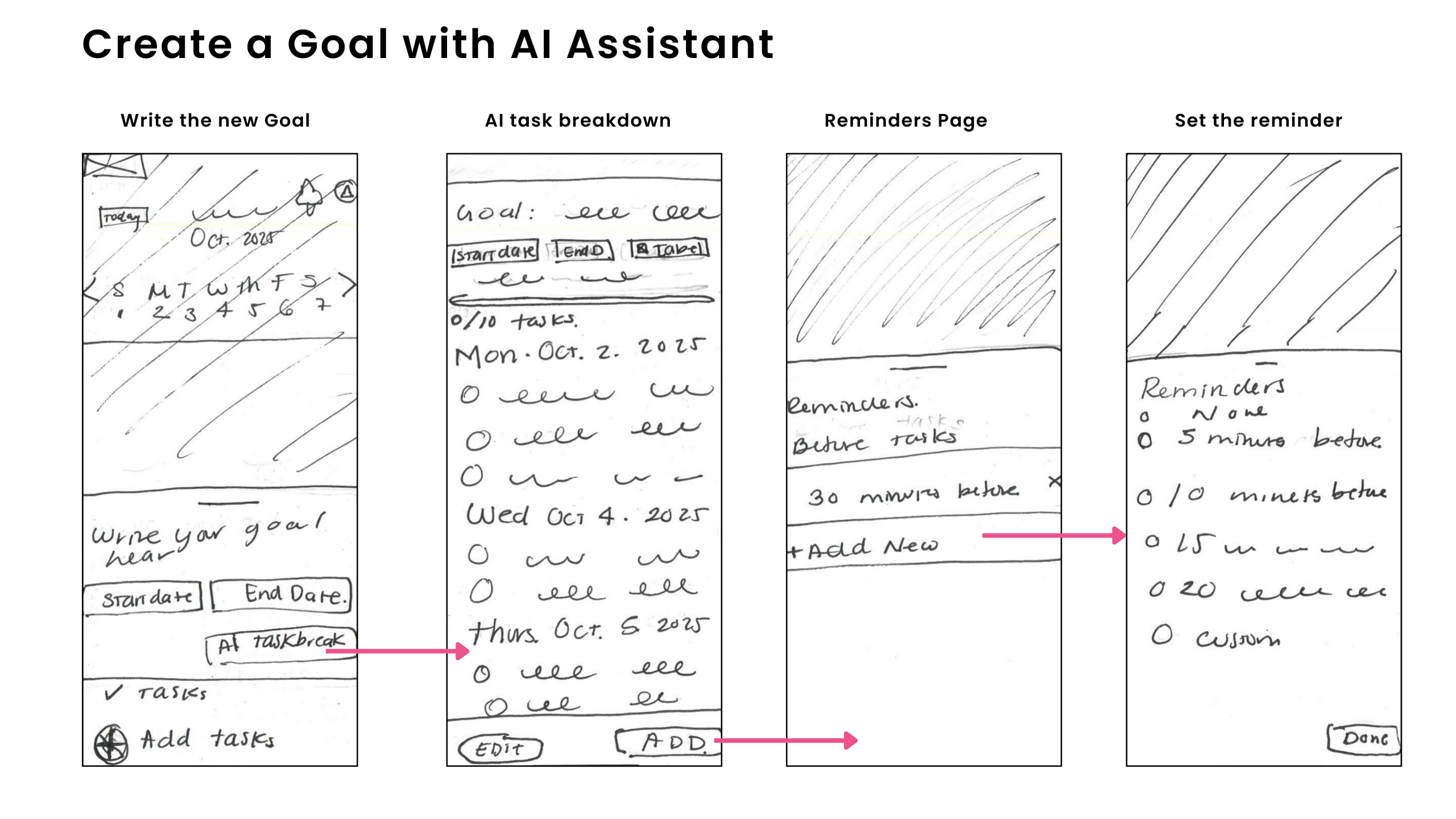
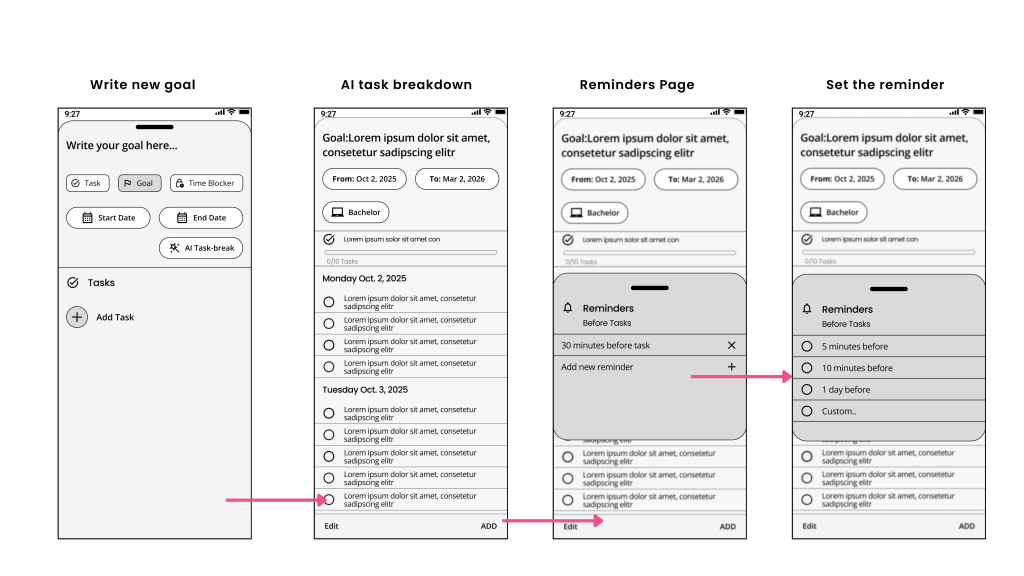
Starting with a mobile-first mindset, I translated and mapped user flows into low-fidelity wireframes to outline how users interact with Goalin’s main features. This was driven by the fact that most of my users preferred a mobile solution they could access whenever they wanted, and to ensure task completion through mobile reminders. My aim was to visualise navigation patterns and structure key interactions—such as task creation, goal tracking, and time blocking—before proceeding to detailed design.
Mid-fidelity: Taking shape 📐
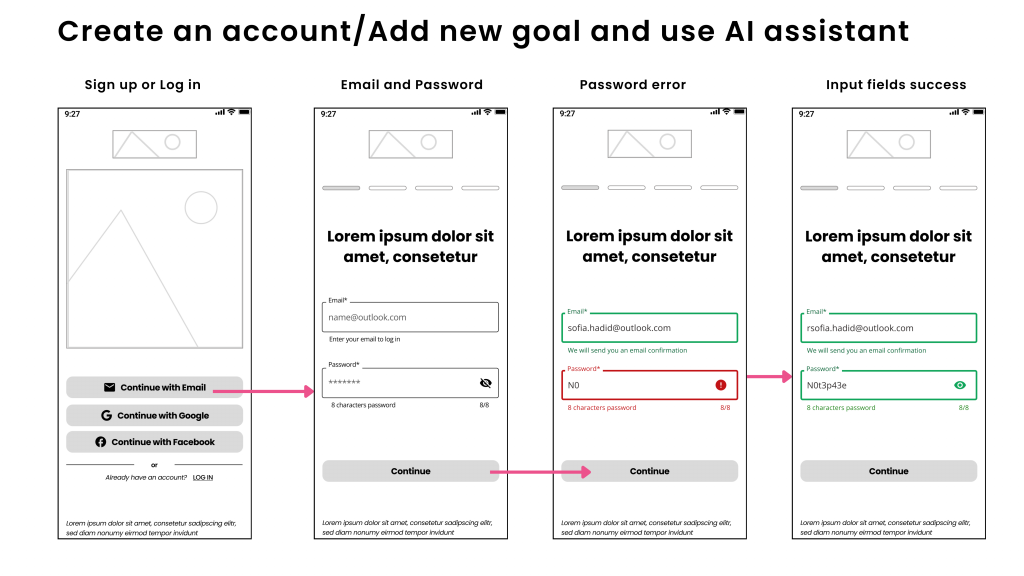
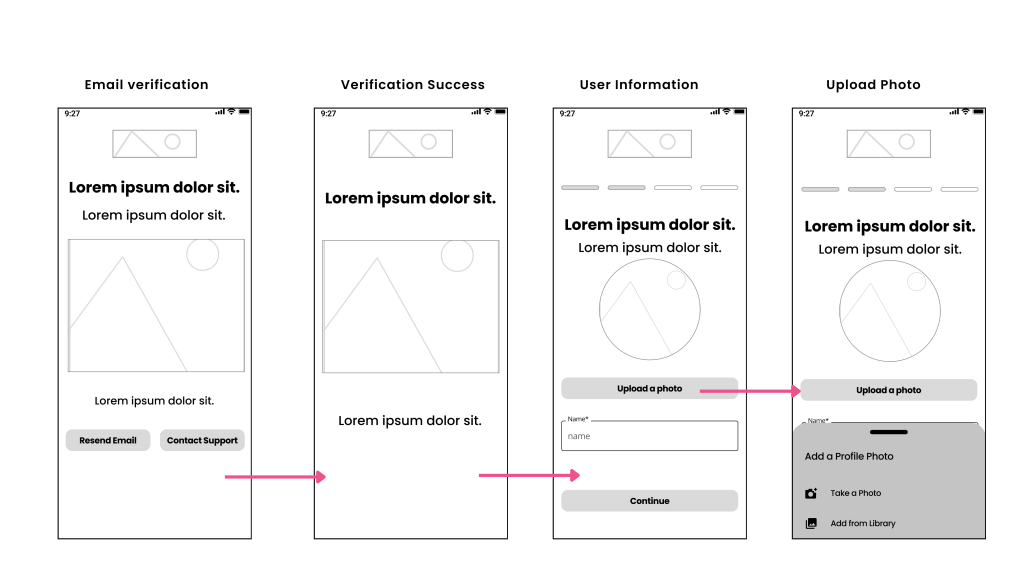
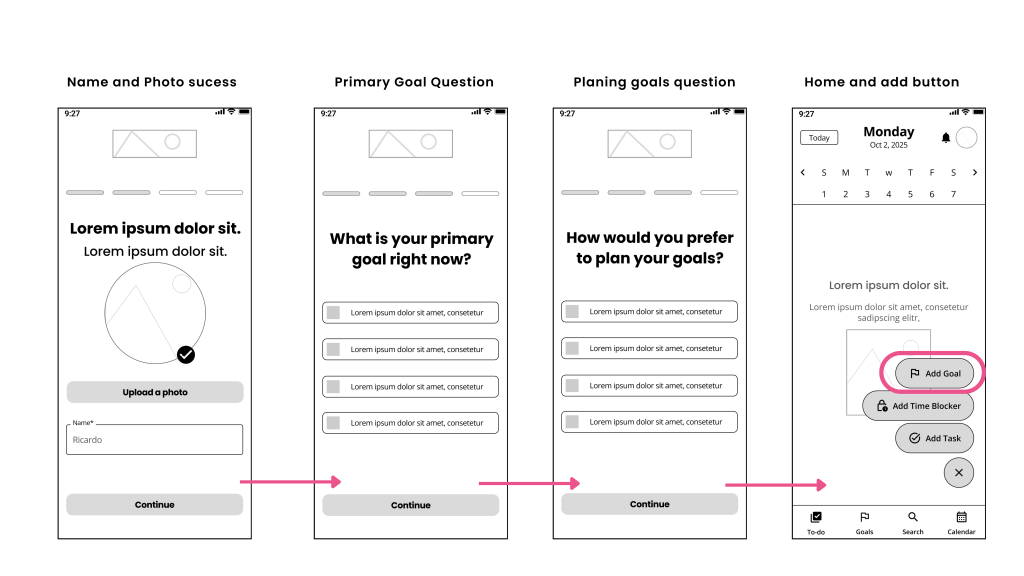
Building on my initial sketches, I created mid-fidelity wireframes that define Goalin’s main interactions—designing the layout, UI components, and navigation users depend on to achieve their goals. I used common design patterns like progress indicators, input feedback, and modal windows to minimize friction and guide users smoothly through the interface with familiar, intuitive elements.
Setting the Mood 🎨
I began with a mood board that captured the emotional tone and aesthetic style of the product. Drawing inspiration from users seeking calm structure and daily motivation, I selected a palette of deep blues and gentle violet-grey, complemented by energetic accents like bold pink and cheerful yellow. This contrast embodies Goalin’s mission—offering a focused, reassuring space with sparks of energy and momentum.
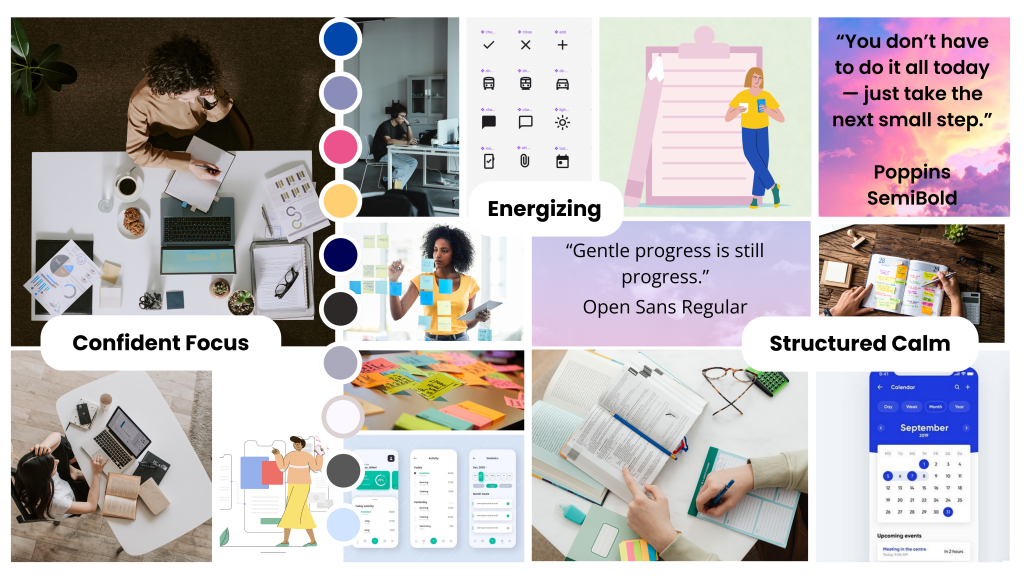
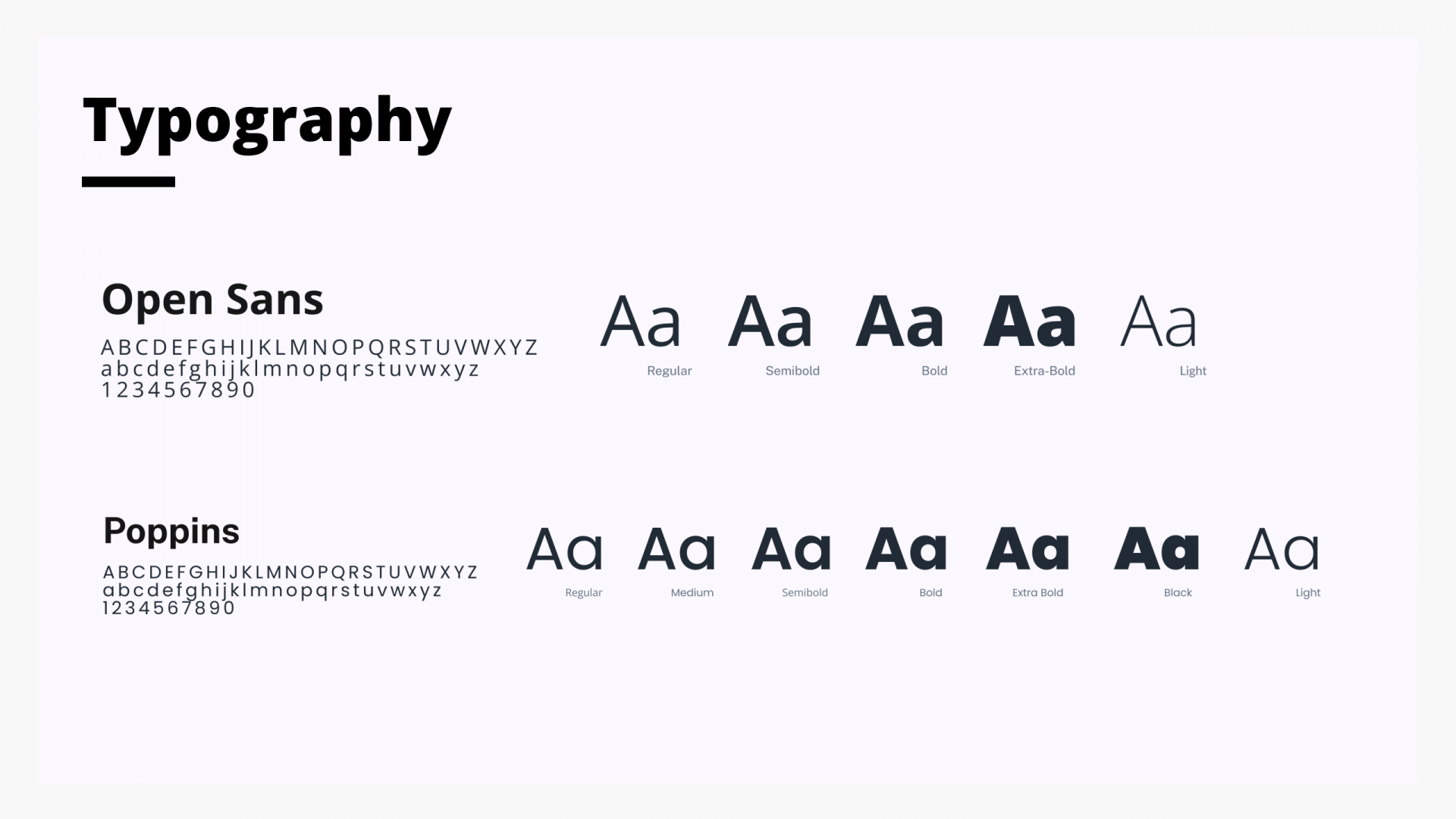
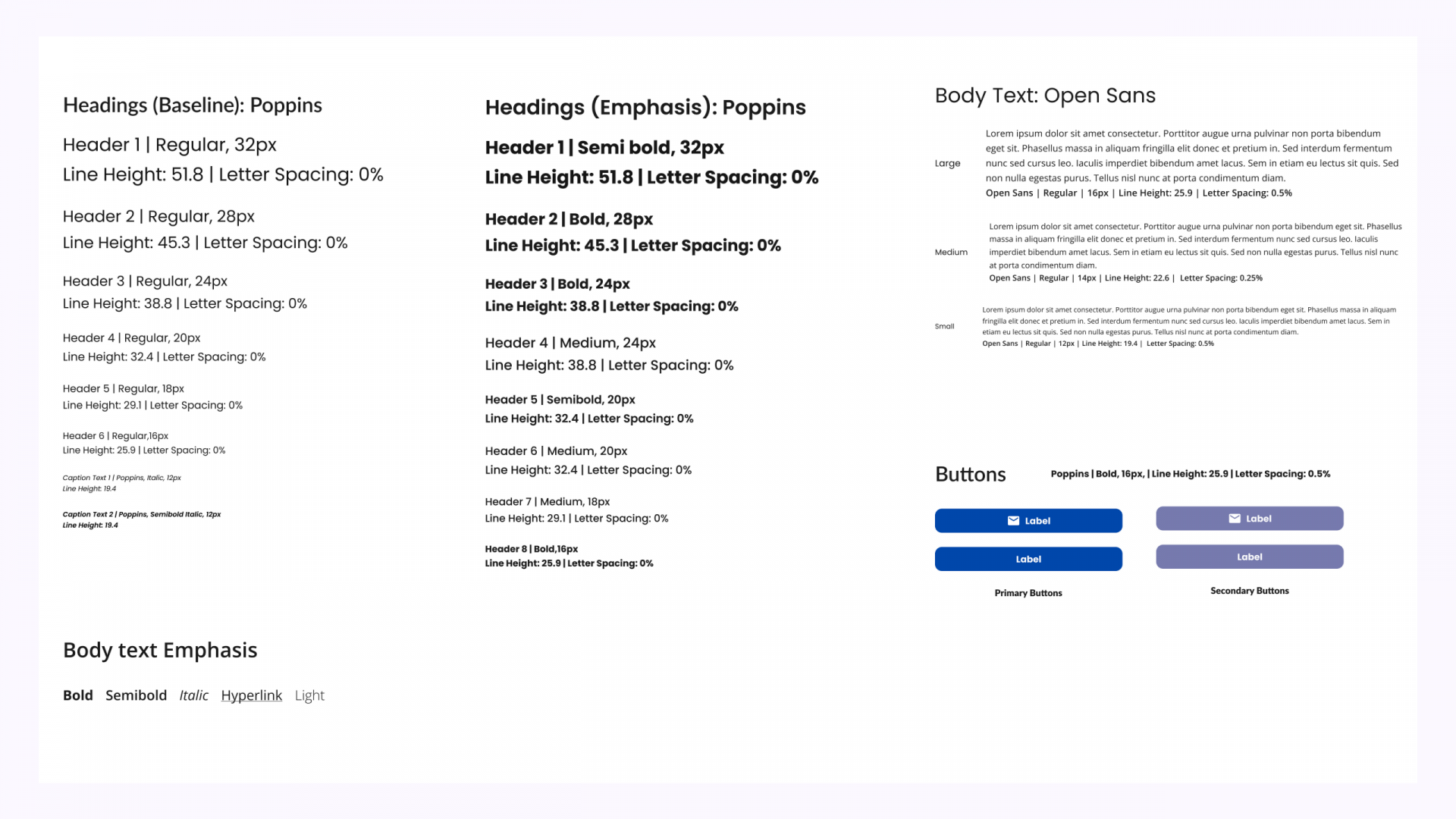
To reflect Goalin’s clear, motivating tone, I chose Poppins for headers and Open Sans for body text. Poppins adds structure and energy, while Open Sans ensures smooth readability on mobile devices. Together, they form a versatile, user-friendly system for content-rich interfaces.
Colouring ideas: Colour Palette 🖌️
Once Goalin’s visual identity was established, I developed a colour palette designed to inspire motivation, calm, and clarity—aligning with users’ need for structure in their daily lives. Rich, vivid blues convey confidence and trust, while pink, violet, and yellow accents add energy and positivity. This combination fosters a focused yet lively interface that encourages productivity without feeling overwhelming.
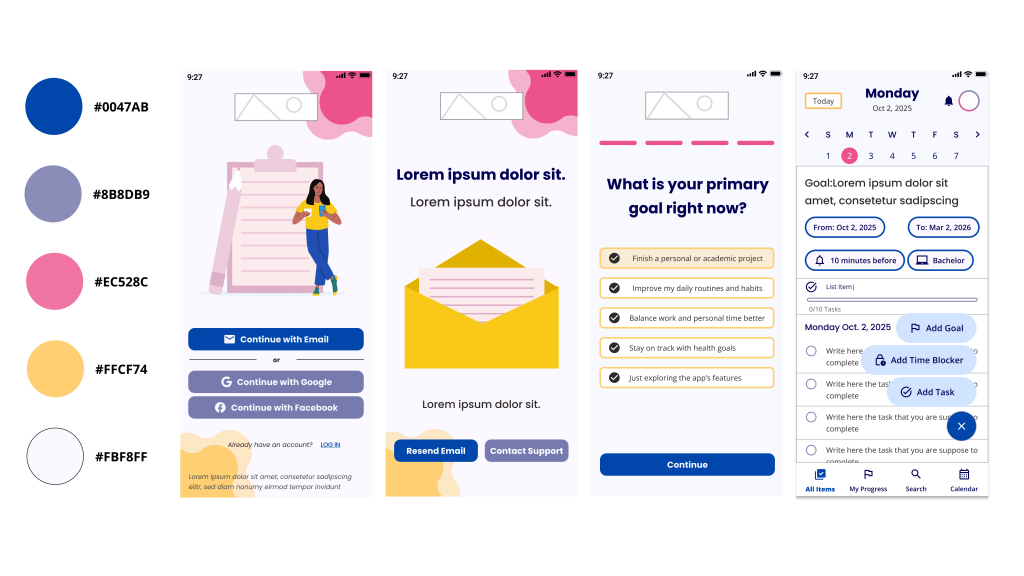
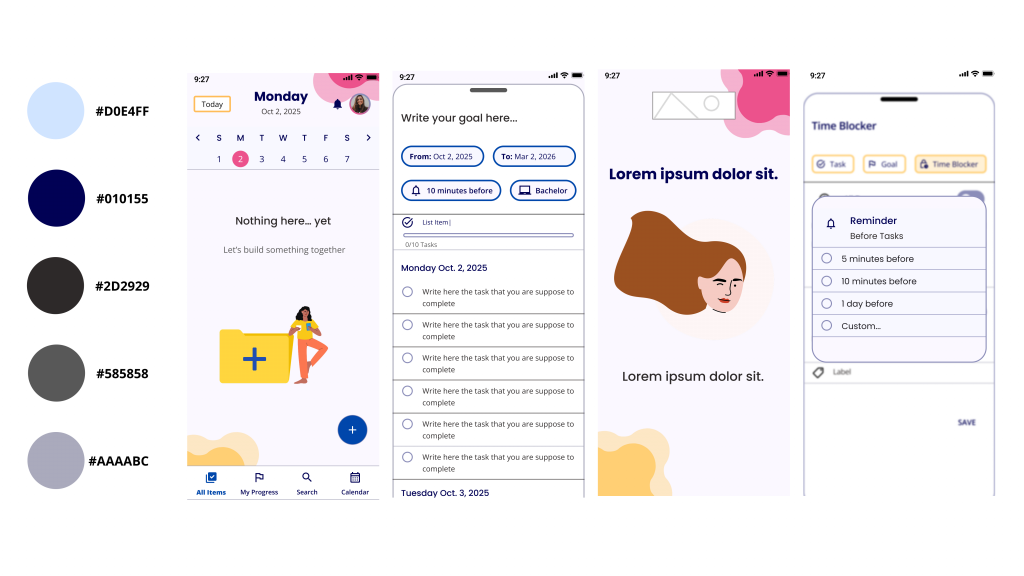
Visual Language ✍️
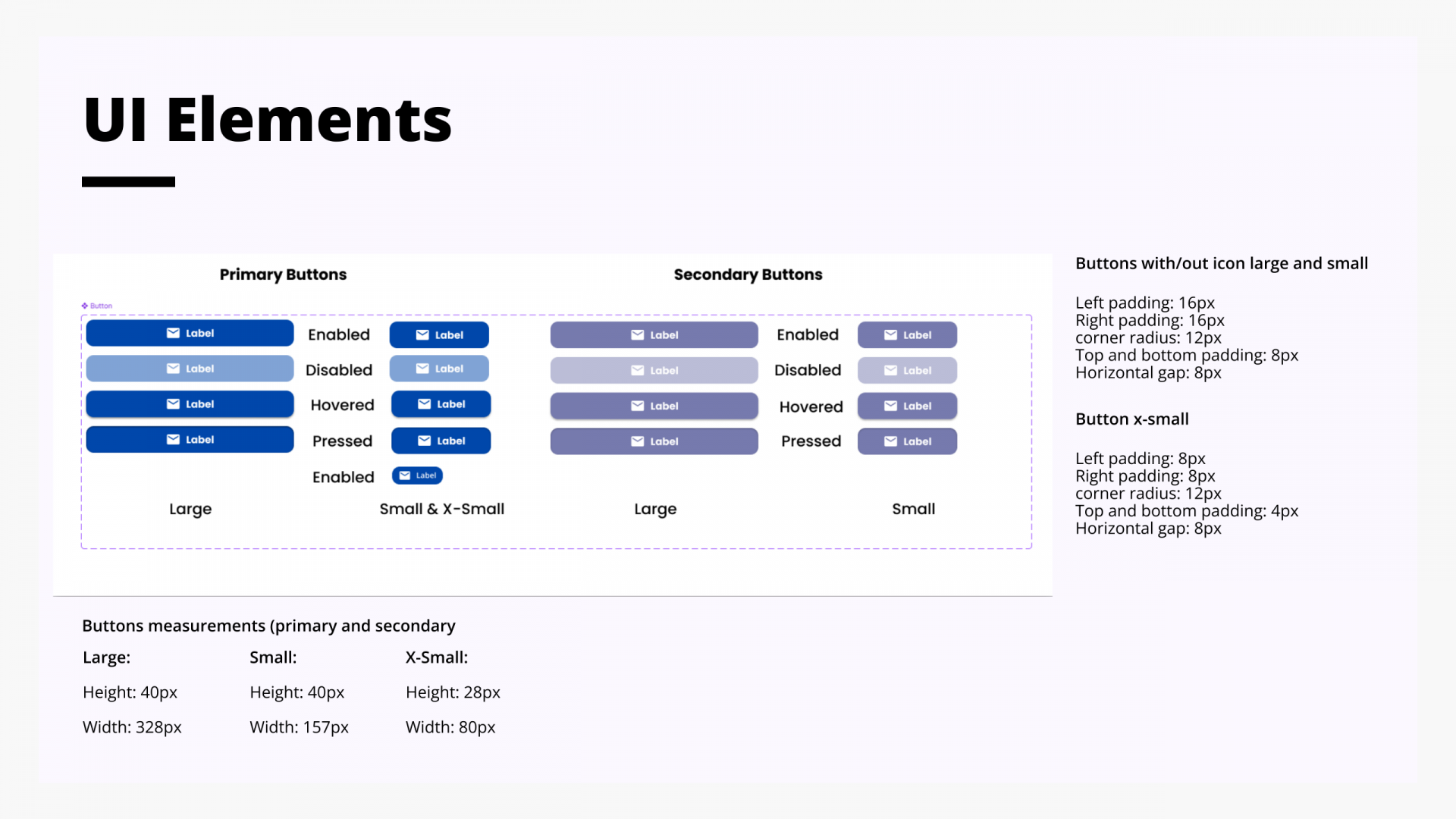
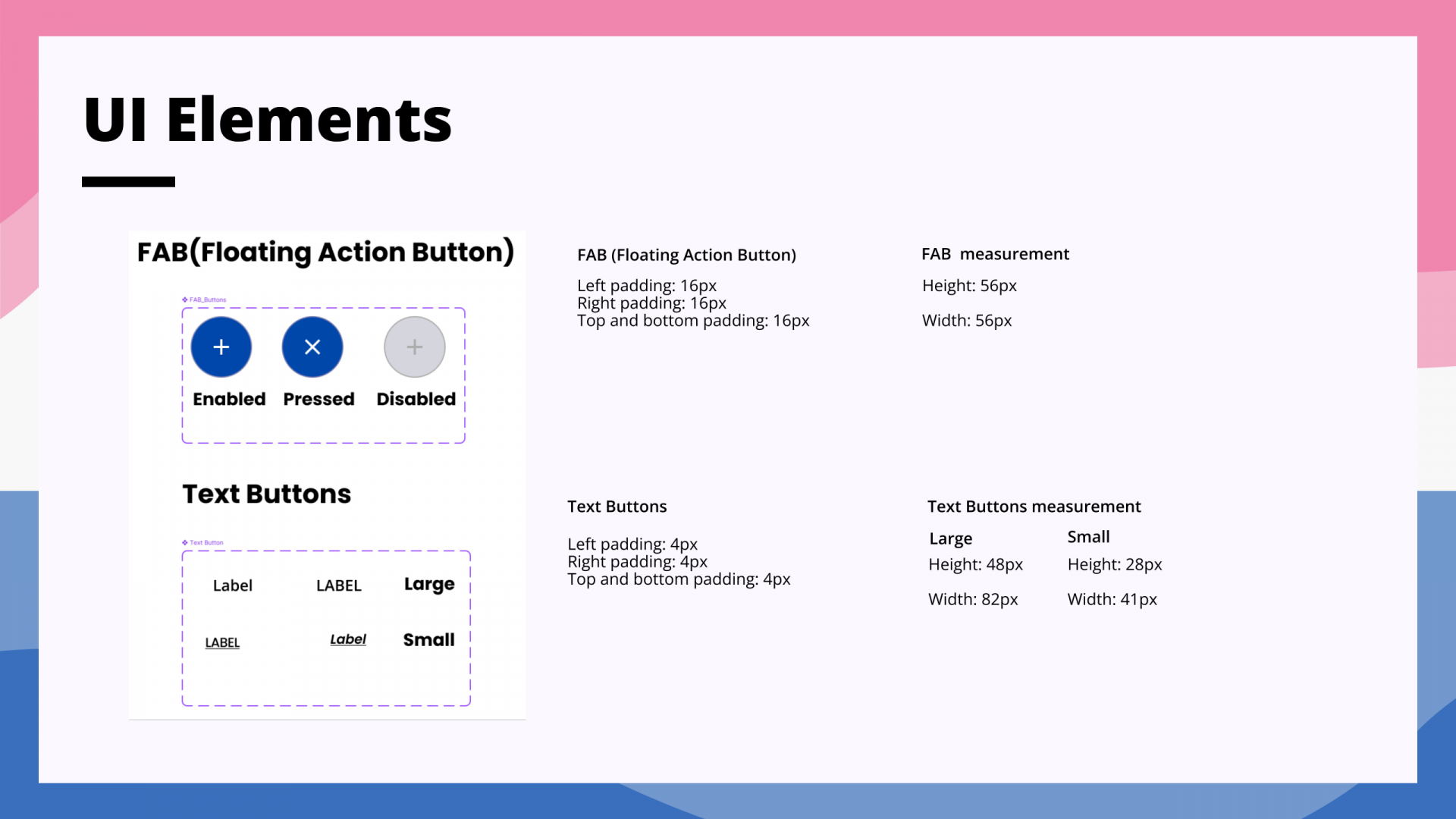
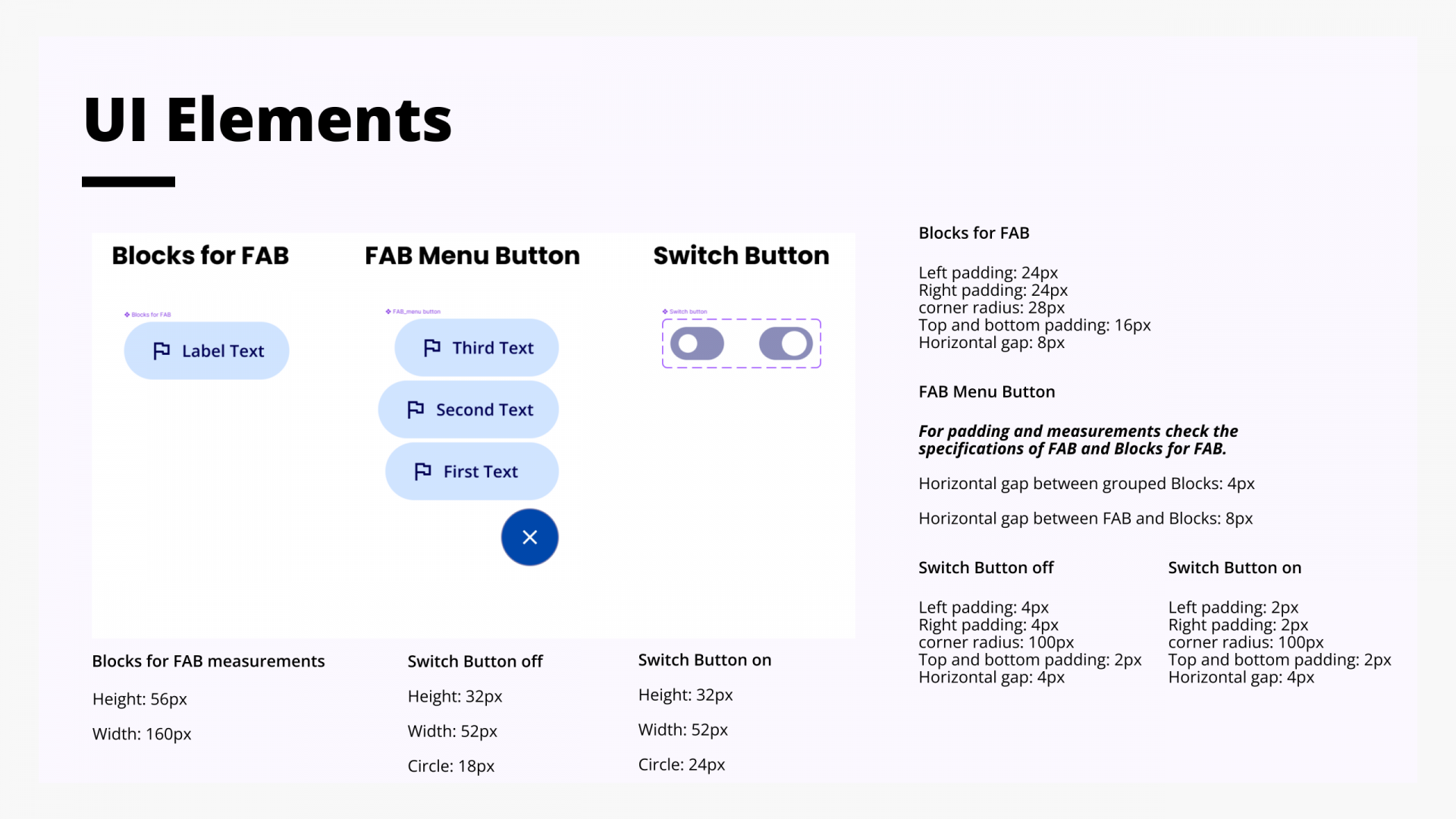
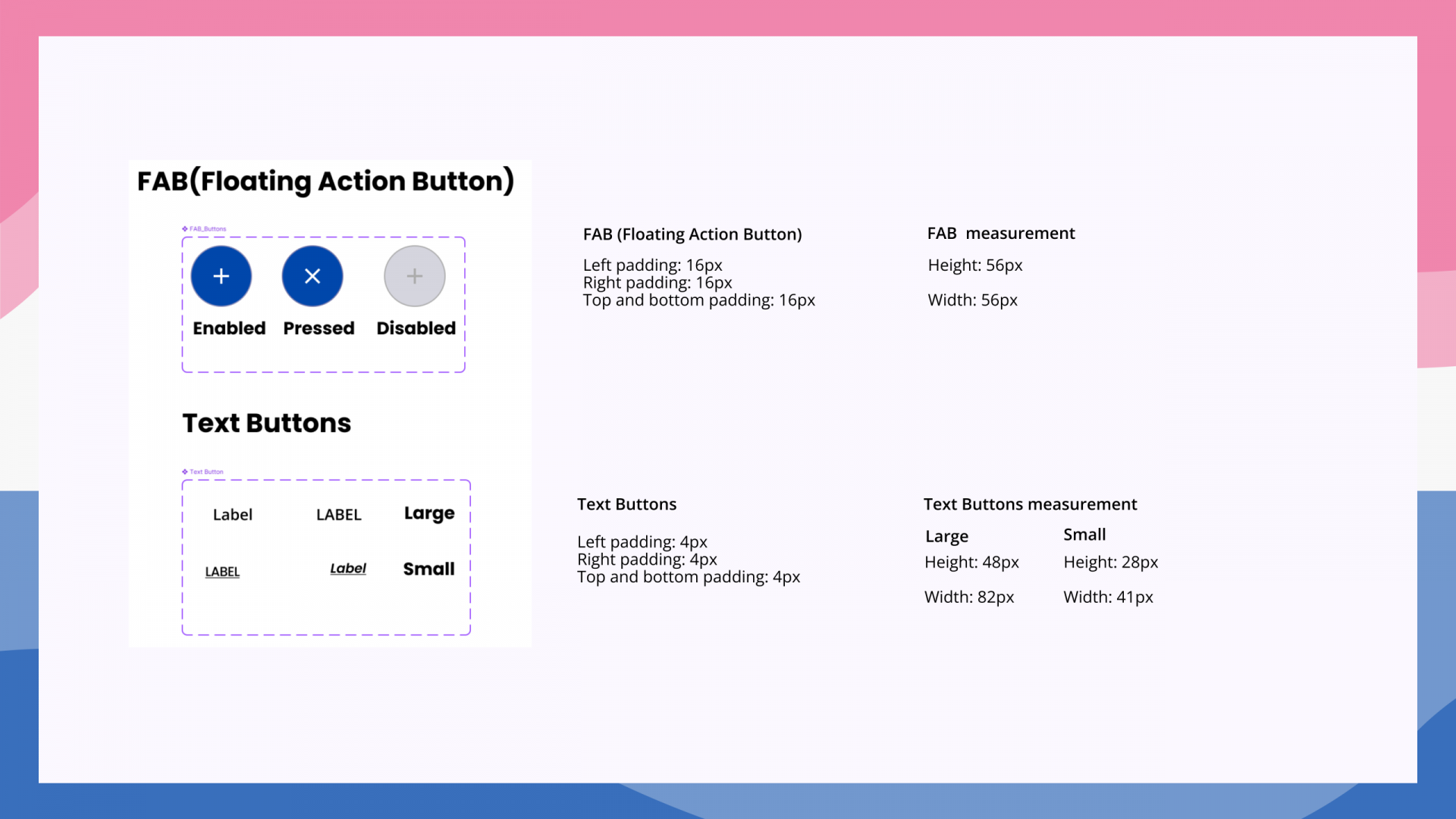
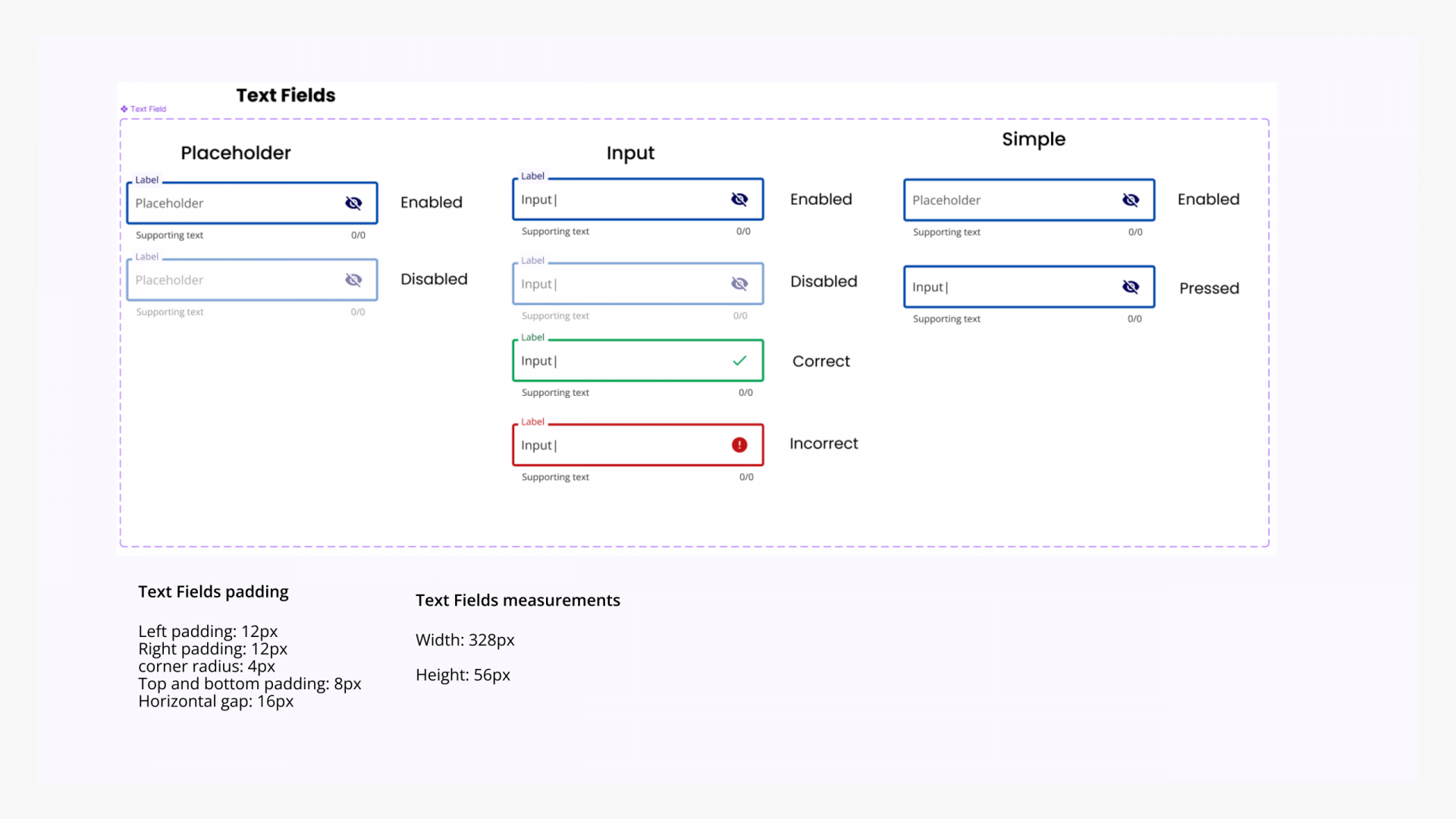
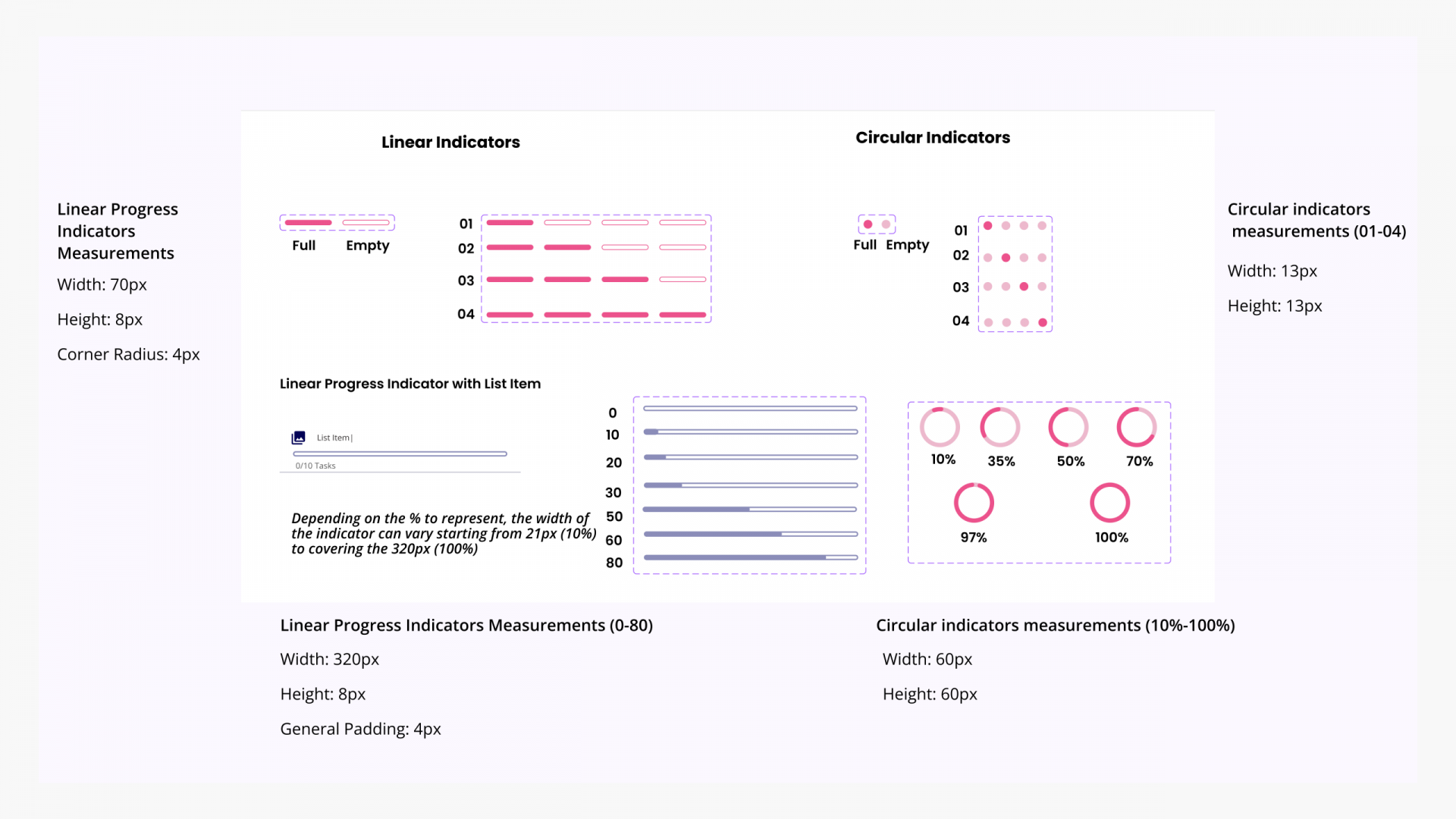
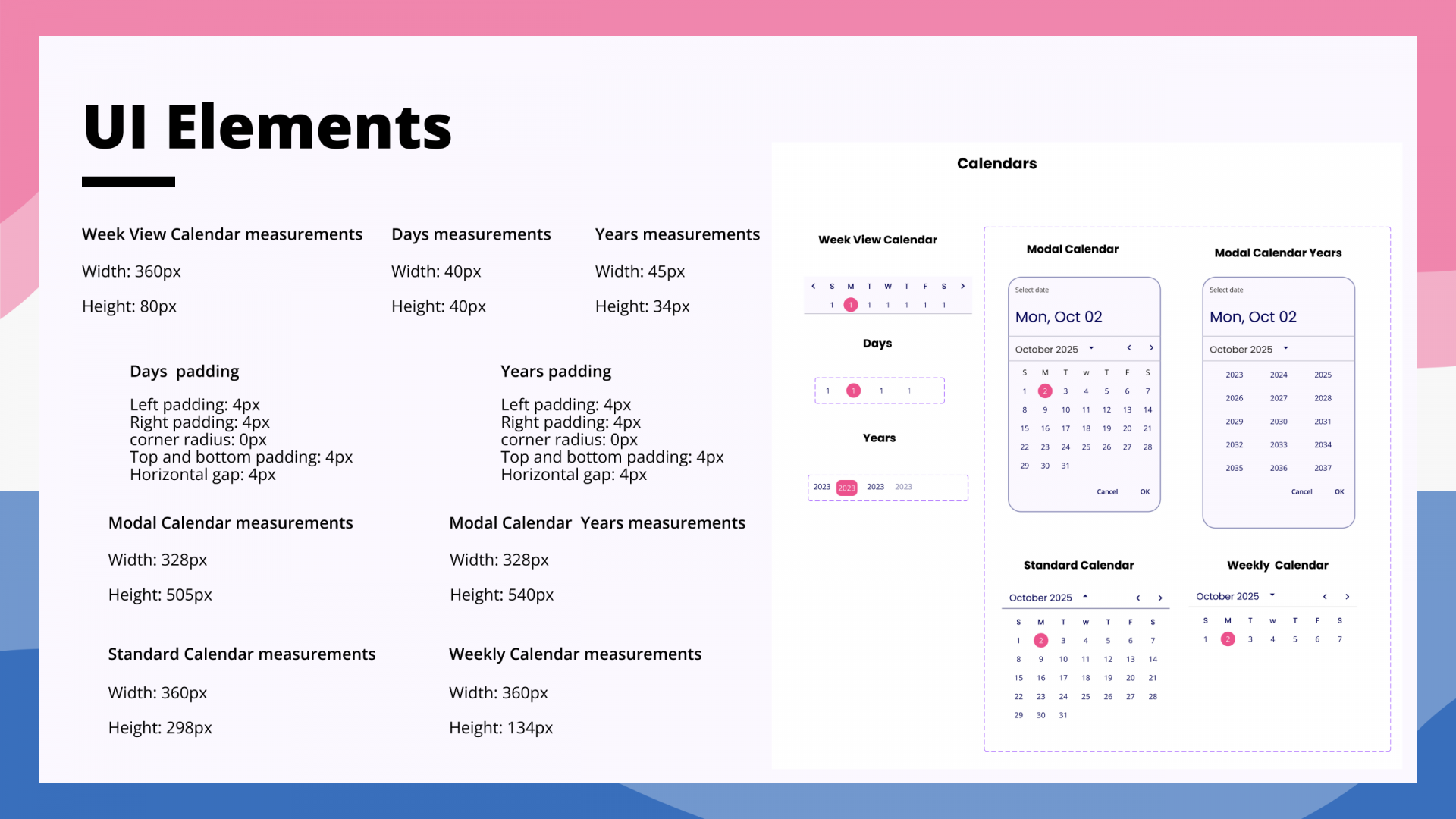
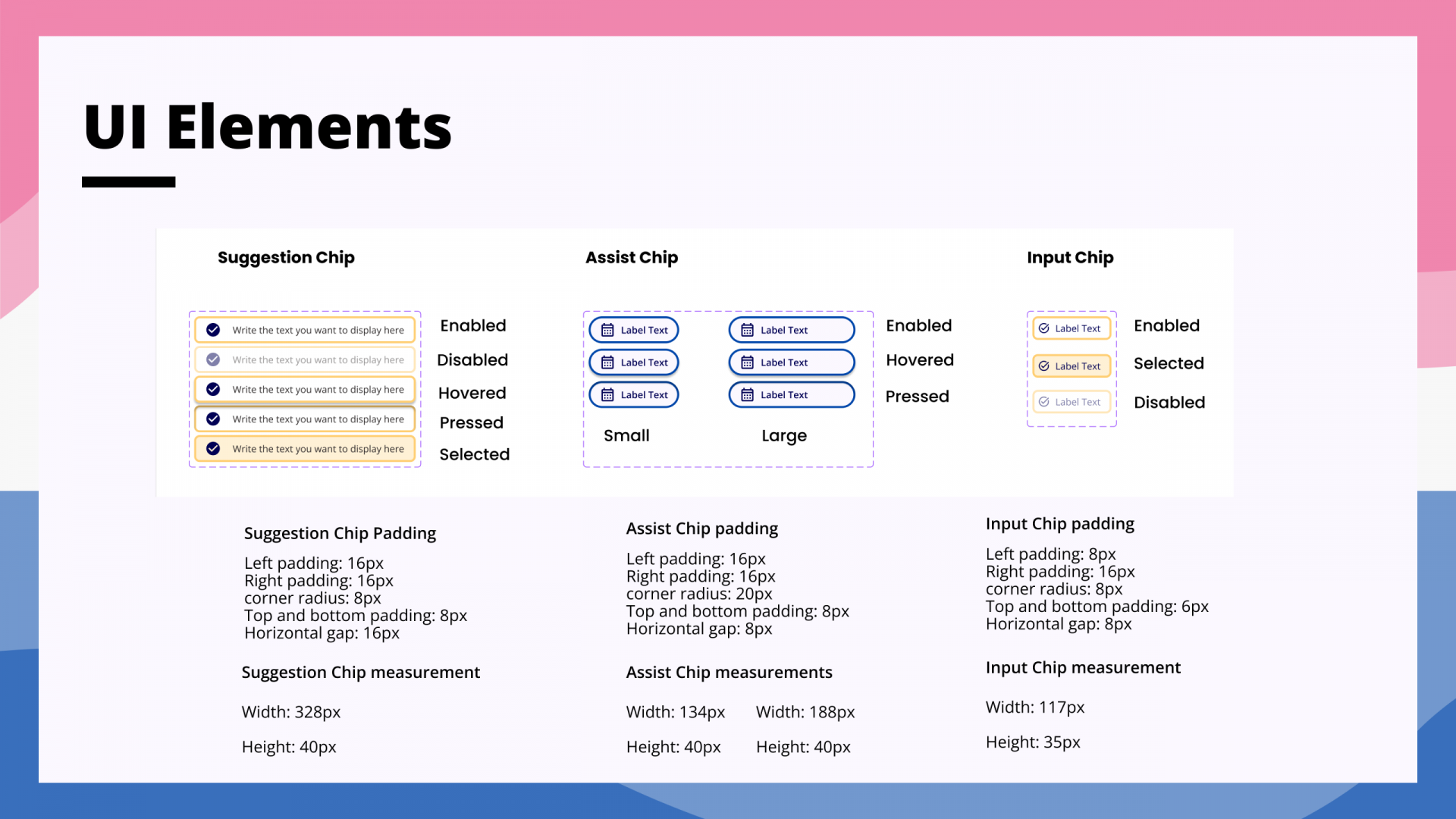
To ensure visual harmony and usability, I translated Goalin’s identity into a consistent UI by designing most components to align with Material Design guidelines. I focused on clarity and familiarity—choosing recognisable patterns to streamline interactions. Primary and secondary colours were carefully assigned to CTAs to guide user focus, while accent colours added energy without distraction. This approach empowered users to navigate intuitively while reinforcing brand trust and coherence.
High-Fidelity, High Impact ✨
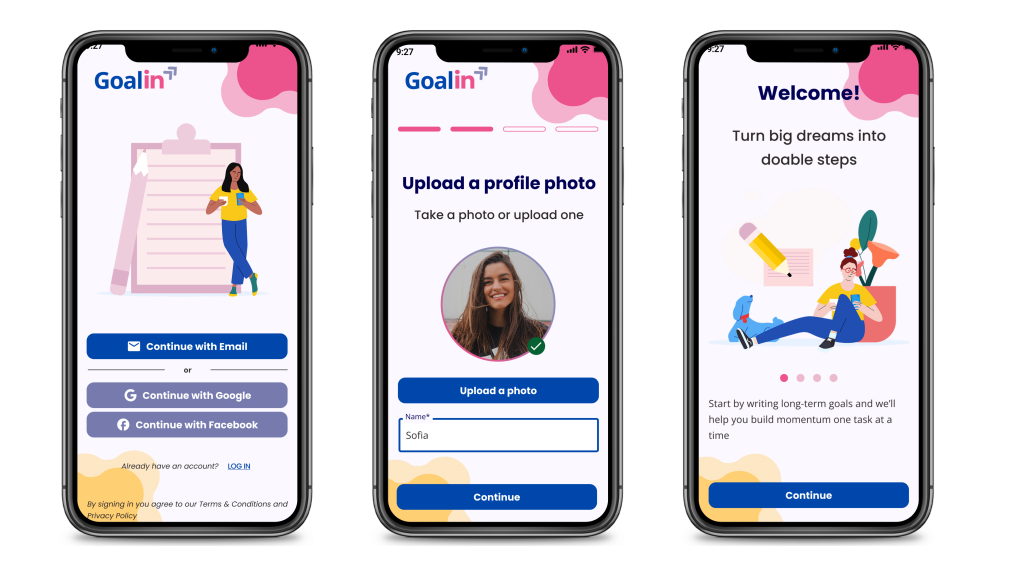
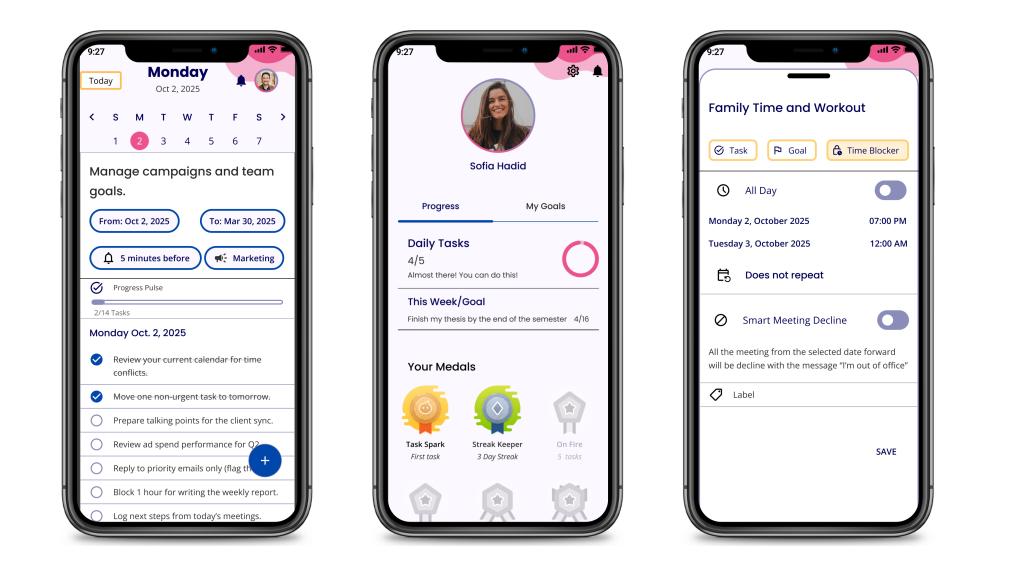
After defining the colour palette and UI components, I refined the wireframes into a functional high-fidelity prototype. I adjusted key elements—such as dialogs and progress indicators—to improve navigation and applied Poppins and Open Sans typefaces to enhance readability. Replacing placeholders with real visuals and adding the logo brought the brand to life, ensuring the MVP was ready for usability testing.
Testing, Learning, Improving 🔄
To evaluate first-time users’ understanding and engagement with Goalin, I conducted three moderated usability sessions—two in person and one remote via Microsoft Teams. Participants completed three scenario-based tasks centred on account setup, AI-powered goal breakdown, and time blocking, allowing me to observe their navigation behaviours and difficulties. This validated the app’s core value proposition and identified usability issues early, ensuring the MVP helps users reach their goals confidently and simply.
1. You’re a student trying to finish some work related to your studiesand have just come across a mobile application called Goalin that can help you plan your work within your daily activities. Using the Goalin application create an account.
2. You’re in the thesis-writing phase aiming to finish by next semester but struggle to plan daily work. Since you have an account, try the AI assistant to break the goal into daily tasks using the Goalin app.
3. As a busy marketing manager, you aim to balance work, health, and family life. To dedicate time to your family and health, you plan to reserve time on your calendar. Use the Goalin app to block out dedicated periods for these priorities.
What did I find?🔍
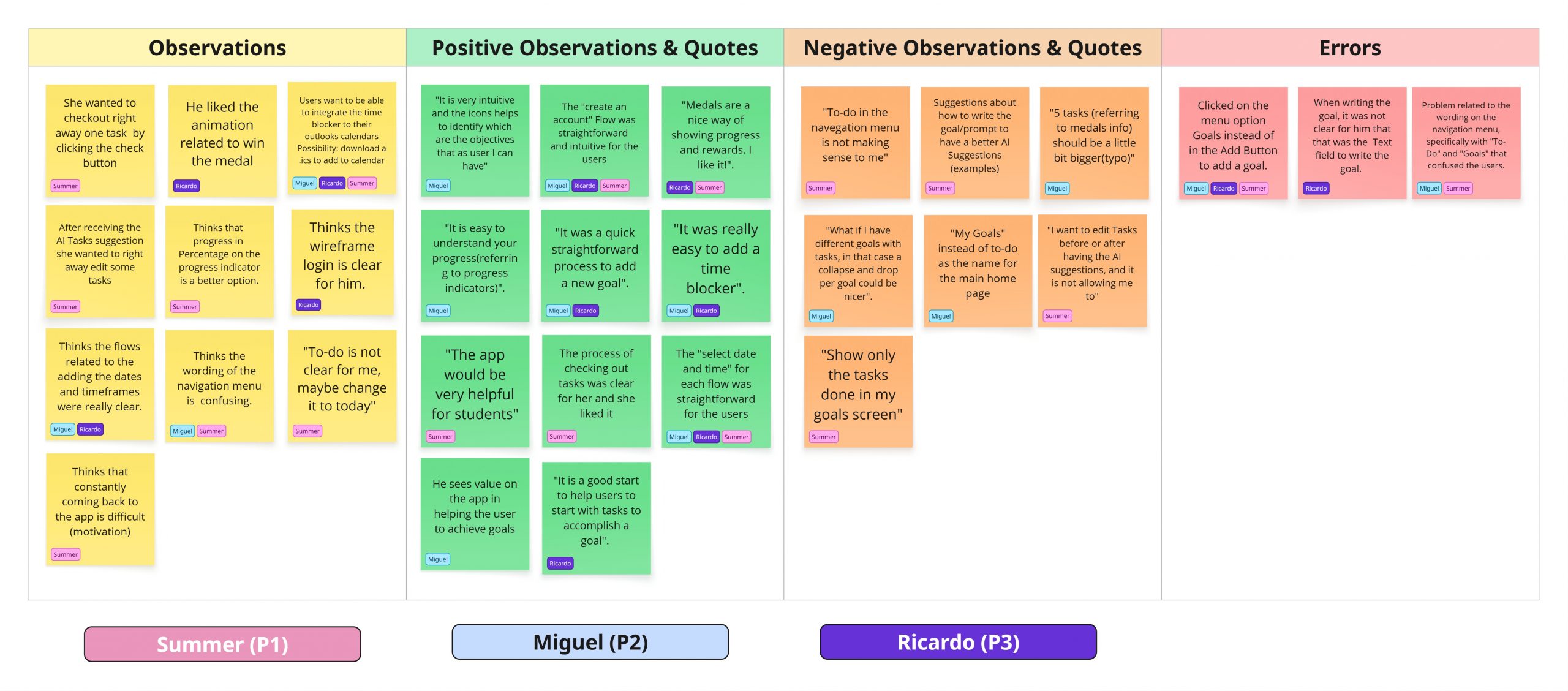
I synthesised participant feedback using affinity mapping, grouping insights into observations, errors, and positive and negative quotes to identify recurring patterns. Then used a rainbow spreadsheet to assess issue severity, helping prioritise critical usability problems. This structured approach enabled me to translate qualitative feedback into clear, actionable improvements and refine the prototype with confidence before the next iteration.
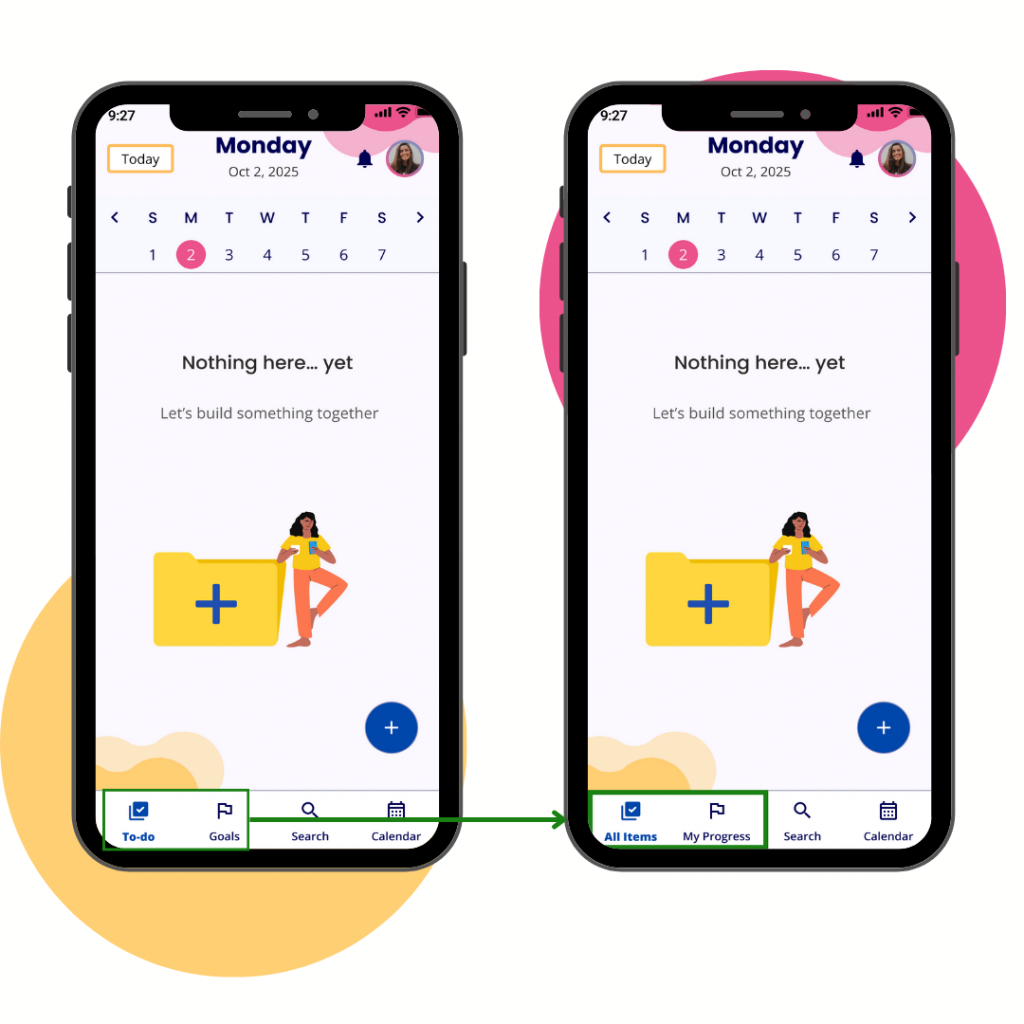
Change 1: : Rename the navigation items“To-Do” and “Goals” to “All Items” and “Progress”.
The initially selected names for the “To-Do” and “Goals” items confused users when navigating the app, misleading them when creating a goal. Changing the navigation menu’s naming conventions helps users avoid confusion while exploring the app and provides a clear understanding of the content they can visualise when tapping.
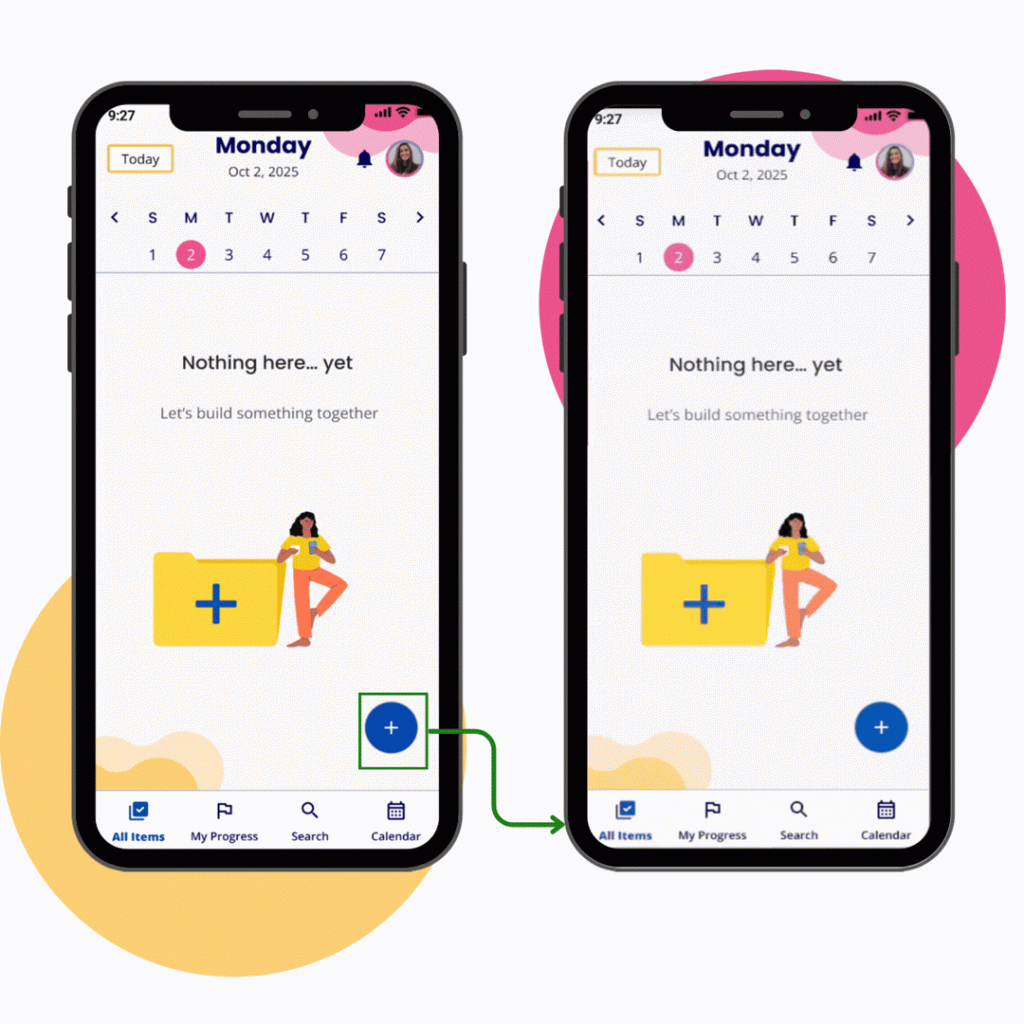
Change 2: Add a one-time “Coach Mark” step that explains to new users how the “Add button” works.
Although not a major usability issue, users initially clicked the Goals menu instead of the “Add Button” due to confusion. Renaming menu options and adding a brief “Coach Mark” explanation improves the understanding of key features for new users. Clarity aids help navigation and enhance the user experience.
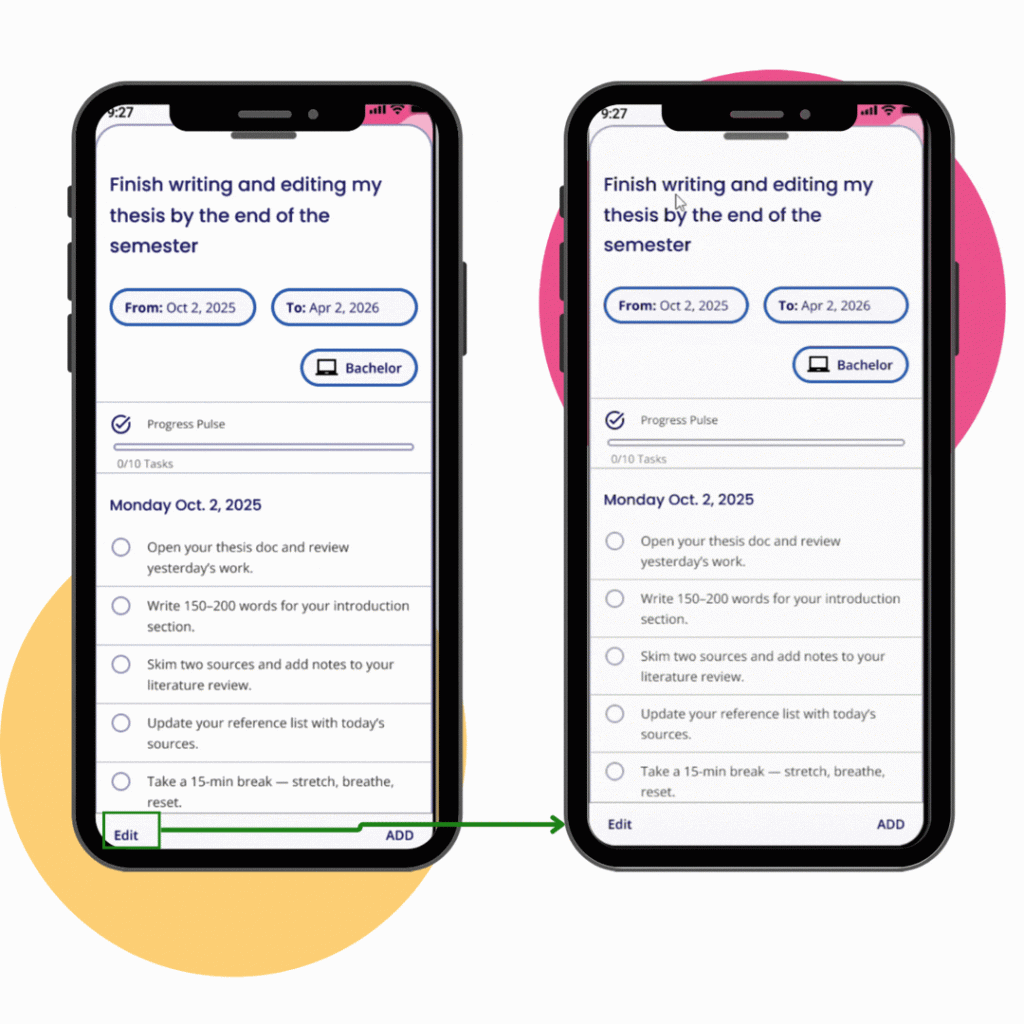
Change 3: Click the Edit button, enable ‘edit mode’ for suggested tasks to modify or delete AI-suggested tasks from the first round.
During usability testing, participants clearly indicated a need to edit tasks after AI suggestions when creating goals. Although task editing was planned for a later phase, feedback showed its importance for user control and confidence. I then added an edit mode enabling users to modify or remove suggested tasks directly. This enhances clarity, reduces friction, and boosts trust by giving users a flexible way to tailor tasks.
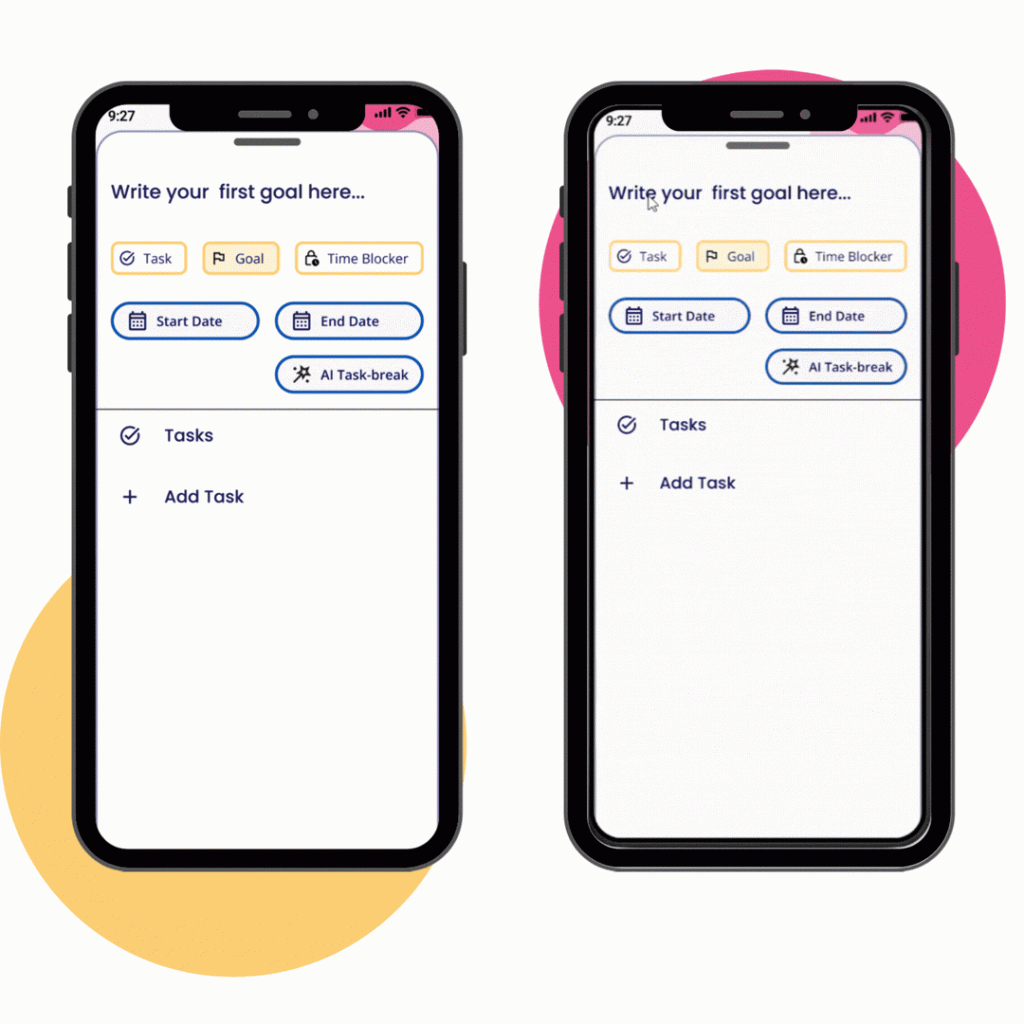
Change 4: Create a 3-step progressive onboarding that explains how to write a clear goal, assisting users in articulating their goals.
Users hesitated to enter a goal because it was unclear where to enter it, and there was no guidance on how to phrase it. Although this did not block task completion, it highlighted an early friction point in the flow. To address this, I introduced clearer text-input patterns and short, contextual guidance to support goal writing. This change improves confidence, reduces cognitive load, and facilitates users’ progress through the onboarding process more smoothly and intuitively.
Built, Tested, Ready 🧠✅
Reflections & Growth ✨
Through Goalin, I translated a personal idea into a user-centred product, applying UX and UI principles to solve a real problem. Through research and testing, I learned that users value clarity, simplicity, and functionality over complex or heavily gamified experiences—especially when managing daily tasks and long-term goals.
The project also enhanced my understanding of how deliberate UX design makes applications truly practical. Integrating AI to support task breakdown showed how technology can reduce cognitive load rather than add complexity. . Creating flows like progress tracking and calendar time blocking pushed me to think systematically, showing how well-organized components and interactions enable users to transition smoothly from intention to action.
What’s Next for Goalin 🚀
Refine and Finish
Refine the existing features and develop the remaining missing ones to achieve a fully mobile application.
Test, test, test
Rum Moderated in-person and remote usability tests to know if the overall navigation and prototype are useful for the user. Modify the MVP based on the usability results and ensure that the changes are effective.
Design for Wearables
Smartwatches can also help users stay motivated, complete tasks, and remind them to return to the app. Create a wireframe that reminds users of their daily tasks and motivates them with notifications to avoid losing their streak. To motivate our users and remind them to return to the app, wearables are required to complete the user experience.